Continuous Delivery
The Continuous Delivery settings define Deployment Quality Gates for the application — rules that must be satisfied before a deployment to a given environment is allowed to proceed. Accessible via Choose Action → Settings → Continuous Delivery.
Deployment Quality Gates

Each quality gate is bound to a specific environment and defines one or more rules that control the deployment flow. The list shows all configured gates across all environments for this application.
| Column | Description |
|---|---|
| Environment | The target environment the gate applies to |
| Rules | The rule type and its configuration (e.g. required approvers) |
| Source | The application the gate belongs to |
| Actions | Edit, delete, or reorder the gate |
Create Deployment Quality Gate
Click + Create New Quality Gate to define a new gate.
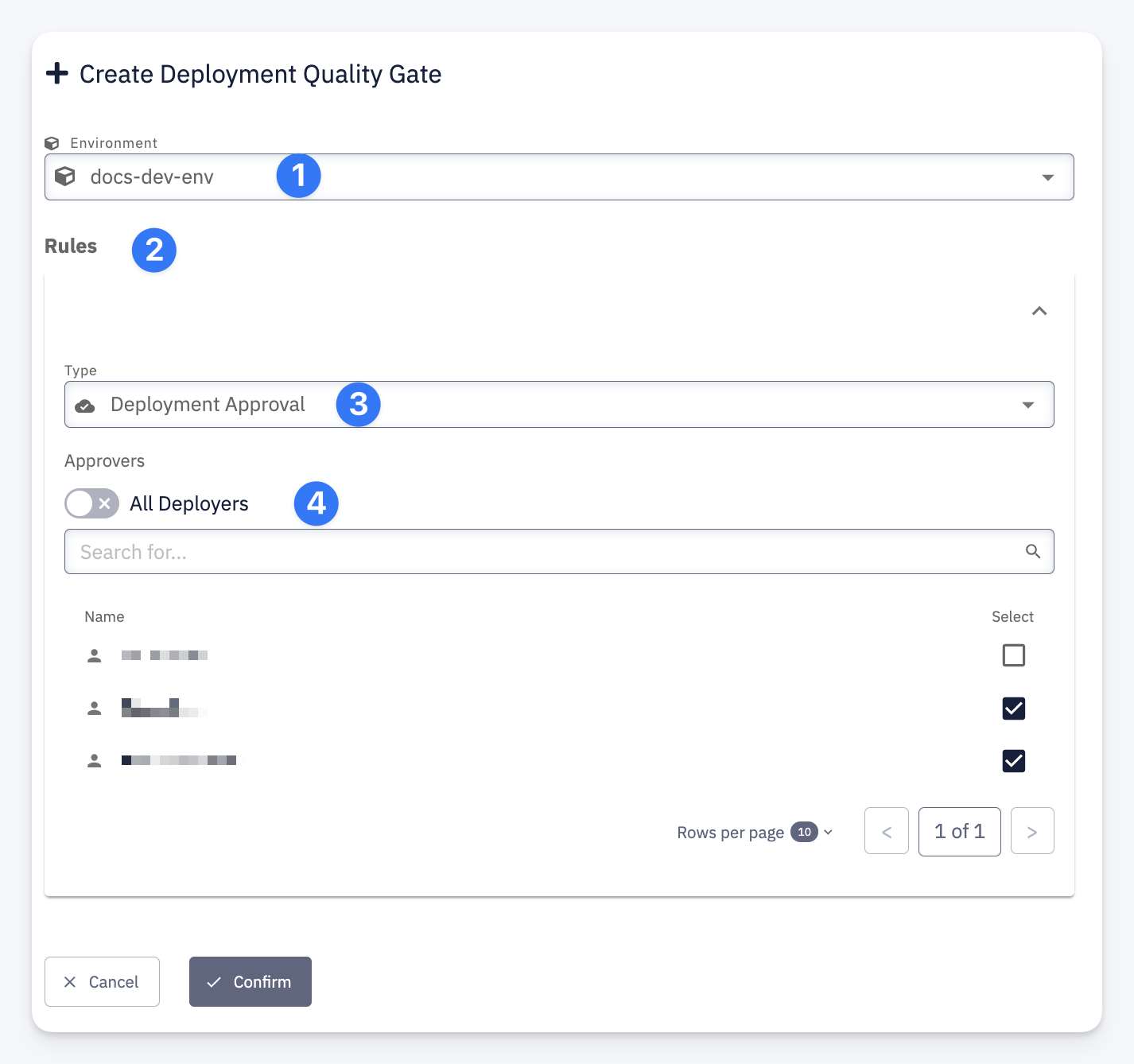
| # | Field | Description |
|---|---|---|
| 1 | Environment | The target environment this gate applies to |
| 2 | Rules | One or more rules that must be satisfied before deployment proceeds |
| 3 | Type | The rule type. Currently available: Deployment Approval — requires explicit approval from designated users before the deployment can continue |
| 4 | Approvers | The users who can approve the deployment. Enable All Deployers to allow any user with the Deployer role on this application, or select specific users from the list |