Managed Service Detail
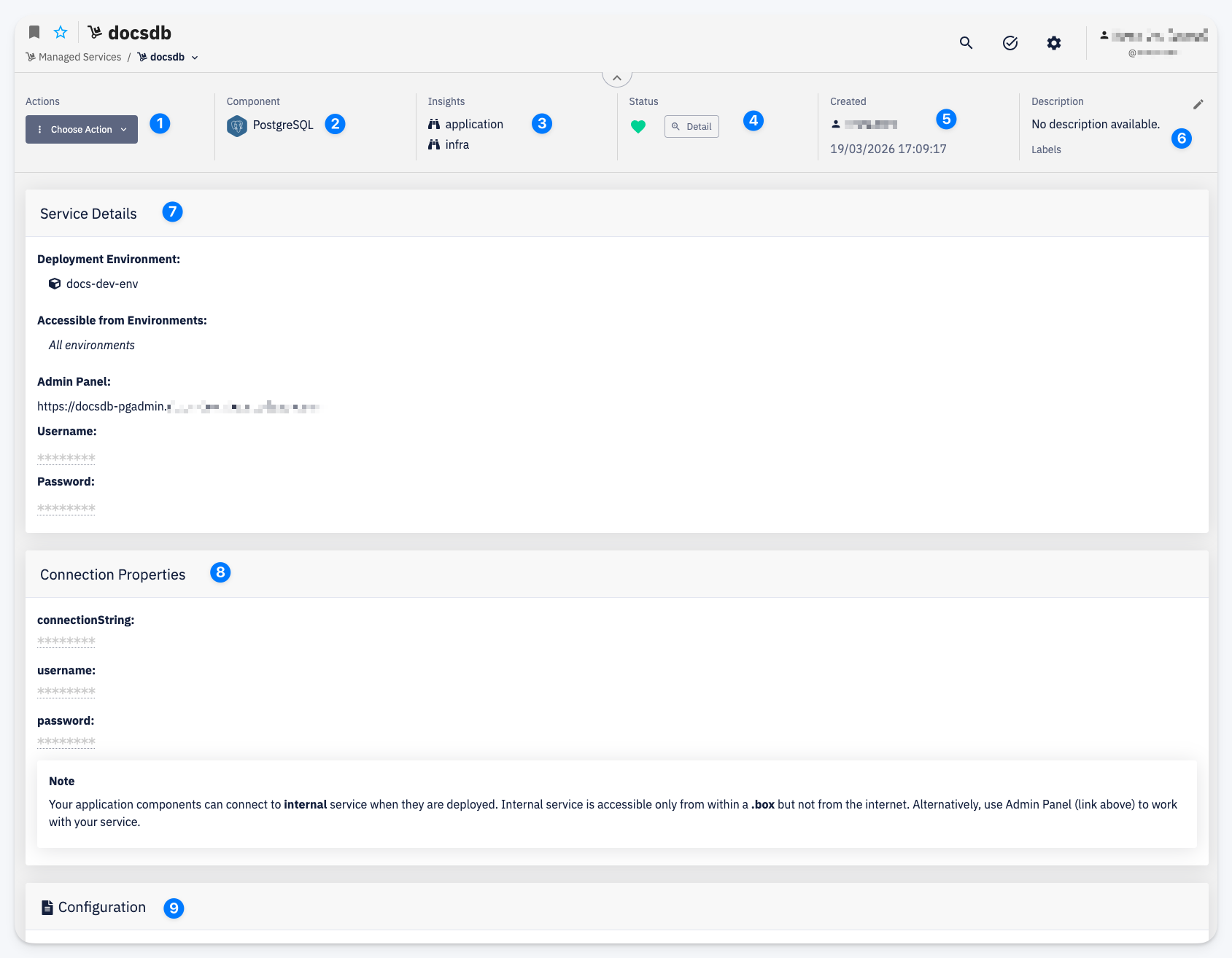
-
Actions — Choose Action menu with access to Settings > Permissions and Delete
-
Component — the managed service type this instance is based on (e.g. PostgreSQL)
-
Insights — quick links to observability dashboards for the service (e.g. application, infra)
-
Status — the current health status of the service; click Detail to view the full status breakdown
-
Created — the user who created the instance and the creation date
-
Description — a short description of the instance; Labels attached to this service
-
Service Details — operational information about the running service:
- Deployment Environment — the environment where the service is deployed
- Accessible from Environments — which environments can connect to this service
- Admin Panel — URL of the service administration interface (e.g. pgAdmin for PostgreSQL)
- Username / Password — credentials for accessing the admin panel
-
Connection Properties — the values your application components use to connect to this service (e.g.
connectionString,username,password). These properties are injected into components that have this service instance assigned in the Deployment Configuration for the given environment.noteApplication components connect to the service via its internal address, which is only accessible within the cluster (
.boxdomain). The Admin Panel link above provides external access for administration purposes. -
Configuration — the configuration parameters set when the service was created, specific to the service type