Managed Services
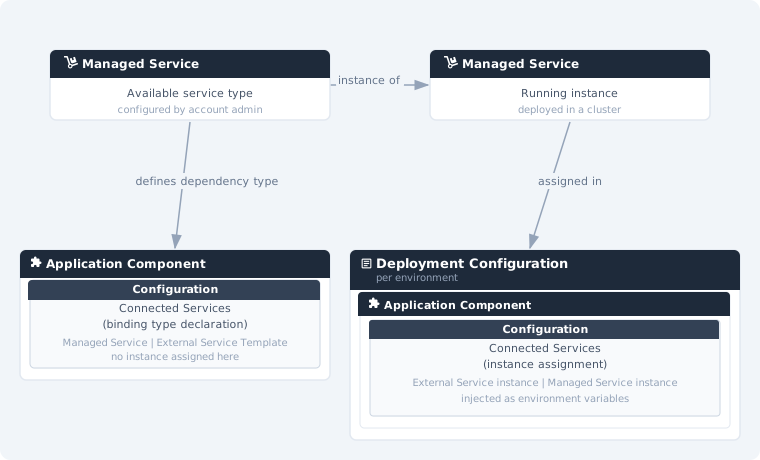
Managed Services are pre-configured component templates that an account administrator makes available in a CodeNOW account. When you instantiate a Managed Service, CodeNOW deploys it into an environment of your choice on one of the clusters connected to the account.
Typical examples include relational databases, caches, message brokers, and other backing services — for example PostgreSQL, Redis, RabbitMQ, or MinIO. The exact set of available Managed Services depends on what the administrators of your account have configured.
The documentation in this section uses PostgreSQL as an example. The available configuration options will differ for other Managed Service types.
How it works
The connection model is identical to External Services. In the Component Detail, a Managed Service type (e.g. PostgreSQL) is added as a Connected Service binding — declaring that the component requires a service of that type at deployment time. No specific instance is set here. The concrete Managed Service instance to use is then assigned per environment in the Deployment Configuration → Connected Services.
The key difference from External Services is that Managed Services run directly inside the connected cluster — they are fully provisioned and managed by CodeNOW rather than being externally operated resources.
What You Can Do
| Action | Description |
|---|---|
| List Managed Services | Browse all managed service instances in your account |
| Create Managed Service | Instantiate a managed service template into an environment |
| Managed Service Detail | View status, configuration, and connected components |
| Delete Managed Service | Remove a managed service instance from an environment |
| Permissions | Manage who can access and modify the service |