Build Detail
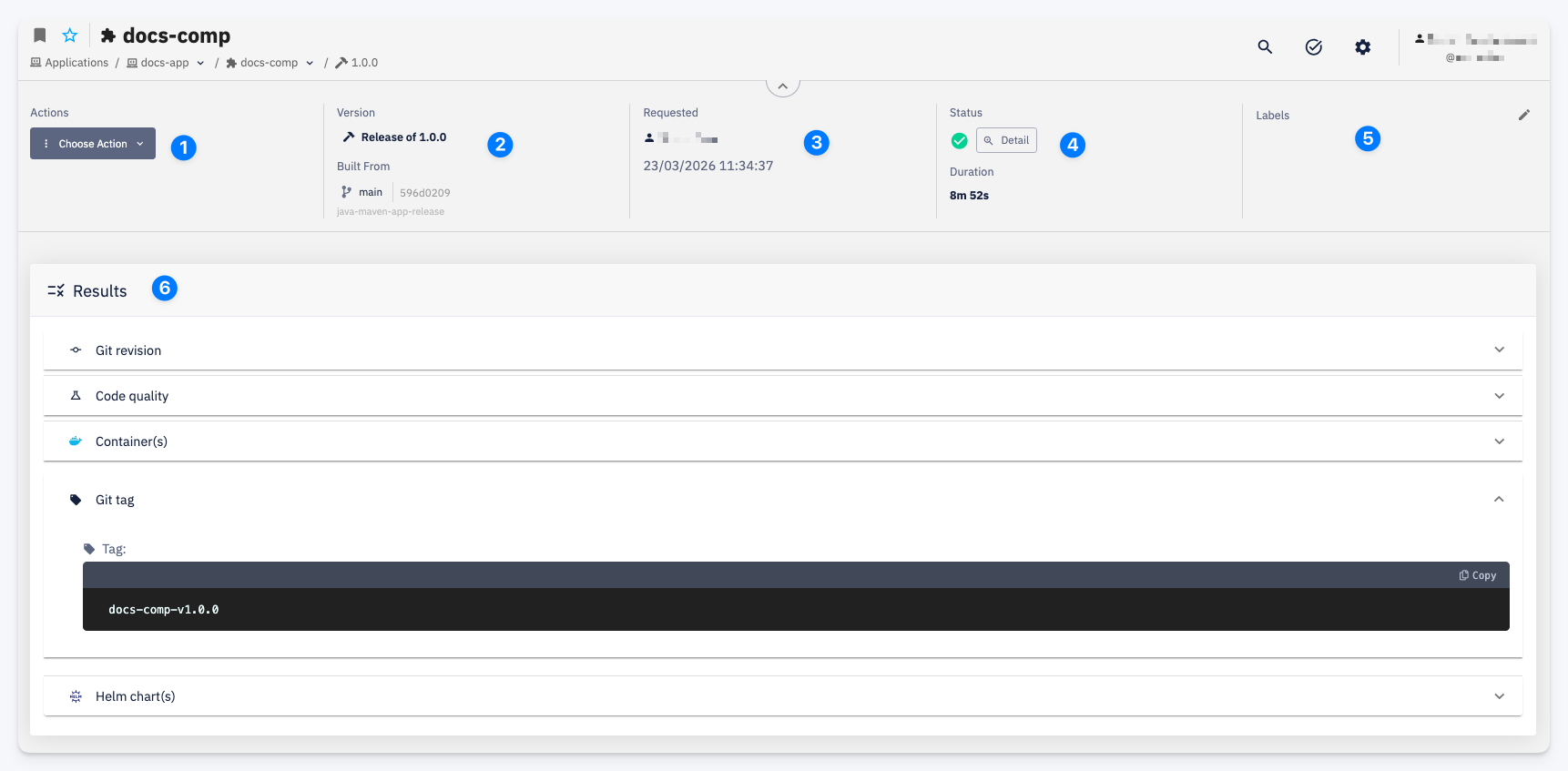
The Build Detail page shows detailed information about a specific build. Open it by clicking the detail icon in the Build History.
-
Actions — Choose Action menu with available actions for this build.
-
Version — the build version and type (e.g. Release of 1.0.0). Built From shows the branch, commit hash, and pipeline configuration used to produce this build.
-
Requested — the user who triggered the build and the date and time it was requested.
-
Status — the overall build result. Click Detail to view the full pipeline log. Duration shows how long the build took.
-
Labels — labels attached to this build. Click the edit icon to modify them.
-
Results — registered build artifacts and outputs, grouped by type. Each section corresponds to a Result Event emitted by the CI pipeline and is collapsible:
- Git Revision — the Git commit that was built
- Code Quality — static analysis results
- Container(s) — Docker images produced by the build
- Git Tag — the Git tag created for this version
- Helm Chart(s) — Helm charts published as part of the build