Vibe Coding Session
A Vibe Coding session is an AI-assisted coding environment that runs in a dedicated container on one of the account's data planes. It allows you to develop application components using natural-language prompts and AI-generated code suggestions — without needing a local development setup.
CodeNOW provisions the container with all component repositories of the selected application cloned and ready, so changes made during the session are committed and pushed like any other development workflow.
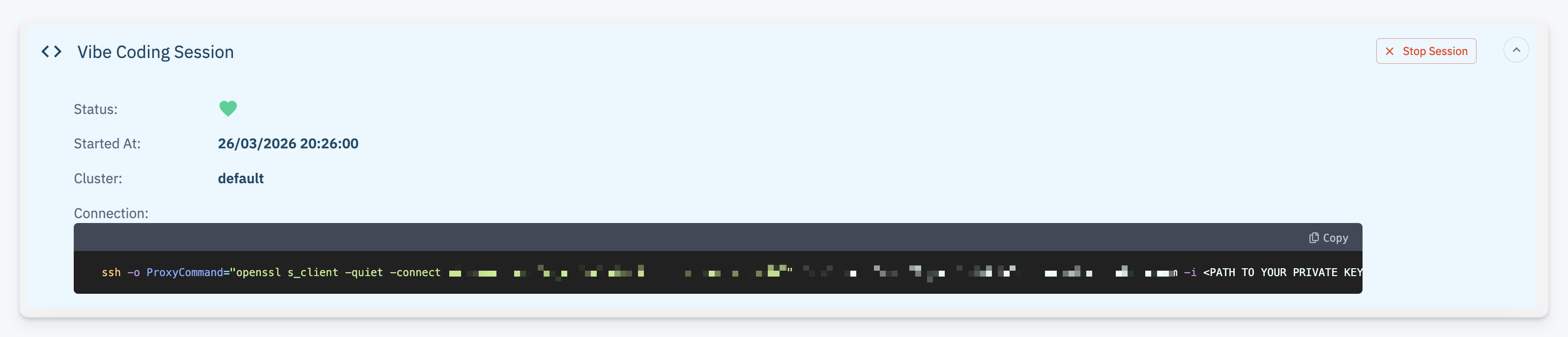
Starting a Session
- Navigate to the Application Detail page
- Click the Start Vibe Coding Session button in the Actions area
- CodeNOW provisions a container on the configured data plane and clones all application component repositories into it
- Once the container is ready, a connection command (SSH) is displayed — copy it and run it in your terminal to connect to the session
- Vibe Coding must be activated on your account by an account administrator before any user can start a session
- You must have a Vibe Coding Session SSH key configured in your Keys & Tokens profile — the key is used to authenticate the SSH connection to the session container
How It Works
When a Vibe Coding session starts, CodeNOW:
- Starts a container on one of the account's data planes (the target data plane depends on the account configuration)
- Clones all component repositories belonging to the application into the container workspace
- Connects an AI assistant that understands your project context — technologies, dependencies, and existing code
You connect to the running container via SSH using the command provided after provisioning. Inside the session the AI assistant can help with:
- Generating new code — describe a feature, endpoint, or UI component and get a working implementation
- Refactoring — ask the assistant to restructure, optimize, or modernize existing code
- Explaining code — get explanations of unfamiliar code sections in your project
- Fixing issues — describe a bug or paste an error message and get a suggested fix
- Writing tests — generate unit or integration tests for existing functionality
Customization
The container image used for Vibe Coding sessions can be customized per account — for example to use a different AI provider or to pre-install additional tools and dependencies. Contact your account administrator for details on the current configuration.
Committing Changes
Changes made during a Vibe Coding session are committed to each component's Git repository. You can review, commit, and push changes from within the session. Once pushed, the changes follow the standard CodeNOW workflow — triggering builds, merge requests, and deployments as configured.
Permissions
Starting a Vibe Coding session requires:
- Developer or Admin role on the application — see Permissions
- A valid Vibe Coding Session SSH Key in your Keys & Tokens profile
Scope and Limitations
- Each session is scoped to an entire application — repositories of all its components are available in the workspace
- One session per user — each user can run only one Vibe Coding session at a time. To start a session for a different application, you must first stop the currently running session.
- Sessions are ephemeral — the container is cleaned up after the session ends, but all committed and pushed changes persist in Git
- AI suggestions are context-aware but should always be reviewed before committing