Build History
The Build History section appears on the detail page of resources that support CI builds (application components, libraries, etc.). It provides a chronological view of all builds triggered for the resource.
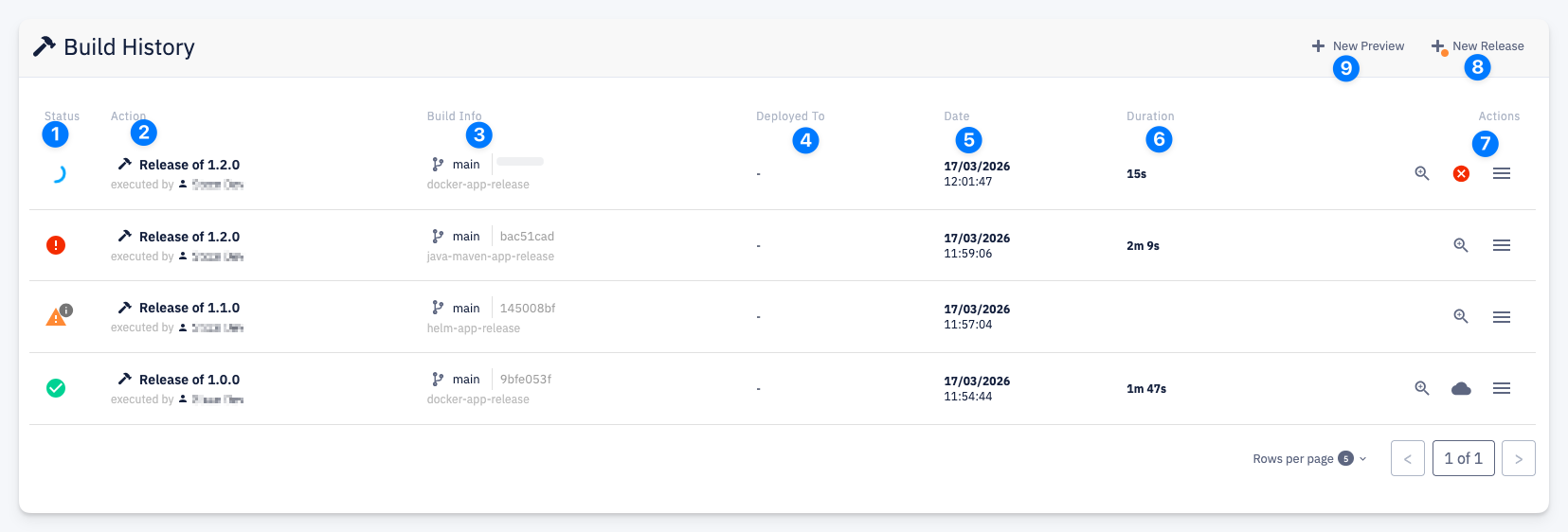
- Status — build result icon:
- In progress
- Failed
- Incomplete
- Success
- Action — the type of build action (e.g. Release of 1.2.0) and who triggered it
- Build Info — the source branch (e.g.
main), commit hash, and pipeline name (e.g.docker-app-release,java-maven-app-release,helm-app-release) - Deployed To — the environment the build was deployed to (if applicable)
- Date — when the build started
- Duration — how long the build took
- Actions — per-build actions:
- Detail — open the build dashboard with build logs and registered build results
- Cancel — cancel a running build
- Direct deploy — deploy this version of the component directly to a target environment. Available only for deployable components.
- More options — additional actions
- + New Release — trigger a new release build. An orange dot indicates that the default branch contains commits that have not been included in any release yet.
- + New Preview — trigger a new preview build
info
The available buttons (+ New Release, + New Preview) depend on the resource type. For example, libraries only support release builds.