Continuous Integration Settings
This section controls the CI pipeline configuration stored in the .codenow.yaml file.
The available settings depend on the resource type and its technology stack. For example, a Java runtime component will have different settings (runtime image, port, JVM parameters) than a Java library (which has no runtime section). Similarly, a .NET component will offer different build images and pipelines than a Java component. The default state of .codenow.yaml is defined by the scaffolder (template) selected when the resource was created.
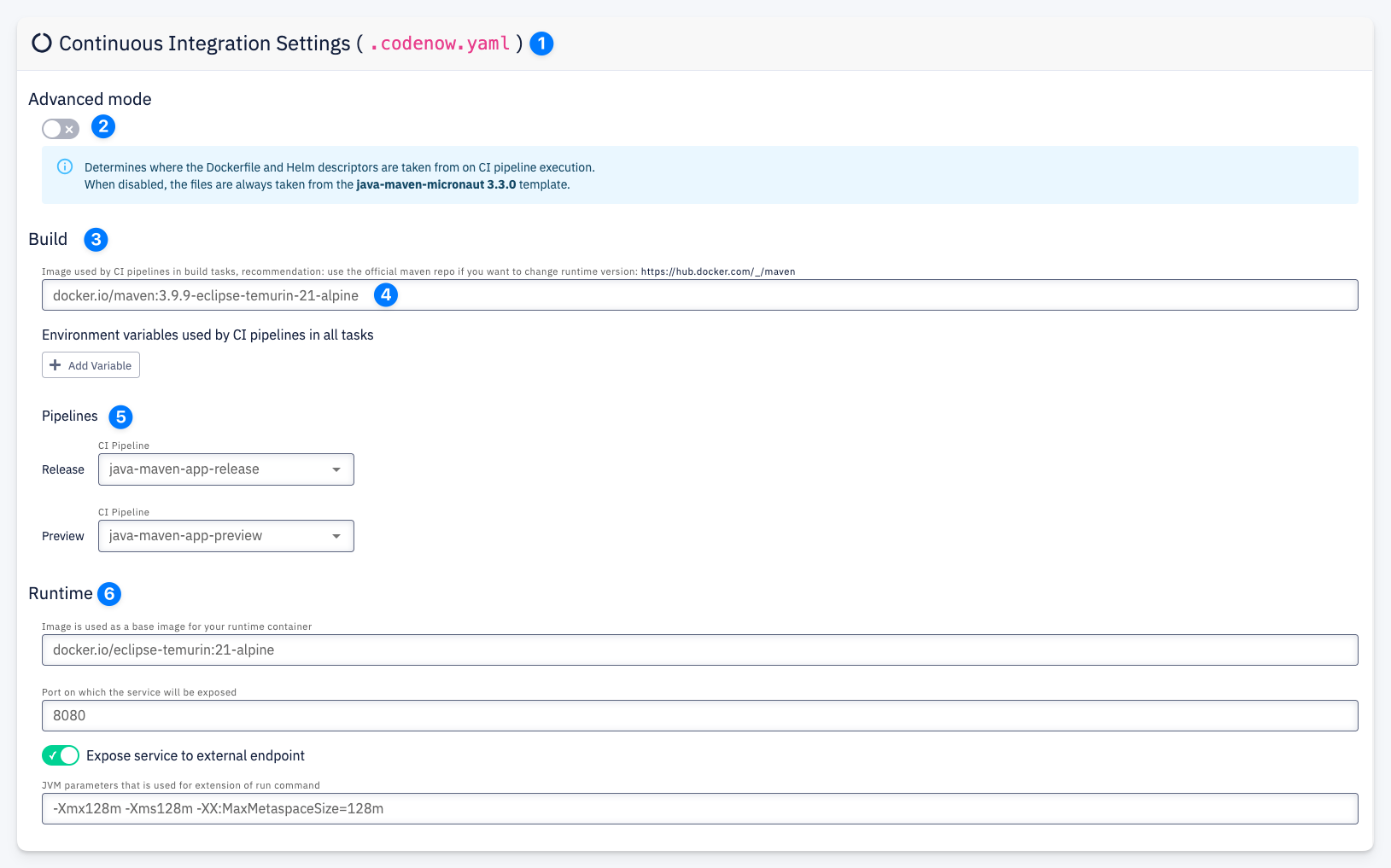
.codenow.yaml— all settings in this section are stored in the.codenow.yamlfile in the resource's Git repository- Advanced mode — when enabled, the Dockerfile and Helm descriptors are taken from the resource's repository during CI pipeline execution. When disabled, they are taken from the template (e.g.
java-maven-micronaut 3.3.0).
When you enable advanced mode and your Git repository does not yet contain a Dockerfile or Helm chart, they are automatically generated from the scaffolder template using the values from the Runtime configuration. You can then customize them as needed.
- Build — configuration for the build stage:
- Build image — the Docker image used by CI pipelines in build tasks. You can change this to any image available on Docker Hub or your private registry.
- Environment variables — define environment variables used by CI pipelines in all tasks. Click + Add Variable to add a new key-value pair.
- Pipelines — select which CI pipeline to use for each build type:
- Release — the pipeline used for release builds (e.g.
java-maven-app-release) - Preview — the pipeline used for preview builds (e.g.
java-maven-app-preview)
- Release — the pipeline used for release builds (e.g.
- Runtime — configuration for the runtime container:
- Image — the base image for the runtime container (e.g.
docker.io/eclipse-temurin:21-alpine) - Port — the port on which the service will be exposed (e.g.
8080) - Expose service to external endpoint — toggle to make the service accessible from outside the cluster
- JVM parameters — parameters used for extension of the run command (e.g.
-Xmx128m -Xms128m -XX:MaxMetaspaceSize=128m)
- Image — the base image for the runtime container (e.g.
The Runtime section is available only for deployable components (application components), not for libraries.
The Runtime section is only available when Advanced mode is disabled. In advanced mode, the container build descriptor (Dockerfile) and deployment descriptor (Helm chart) are fully under your control in the Git repository — no templating is applied. Changes to runtime settings must be made directly in these files.