Library Template
The template detail page is the central hub for managing a single Library Template. Open it by clicking a template name in the Template List.
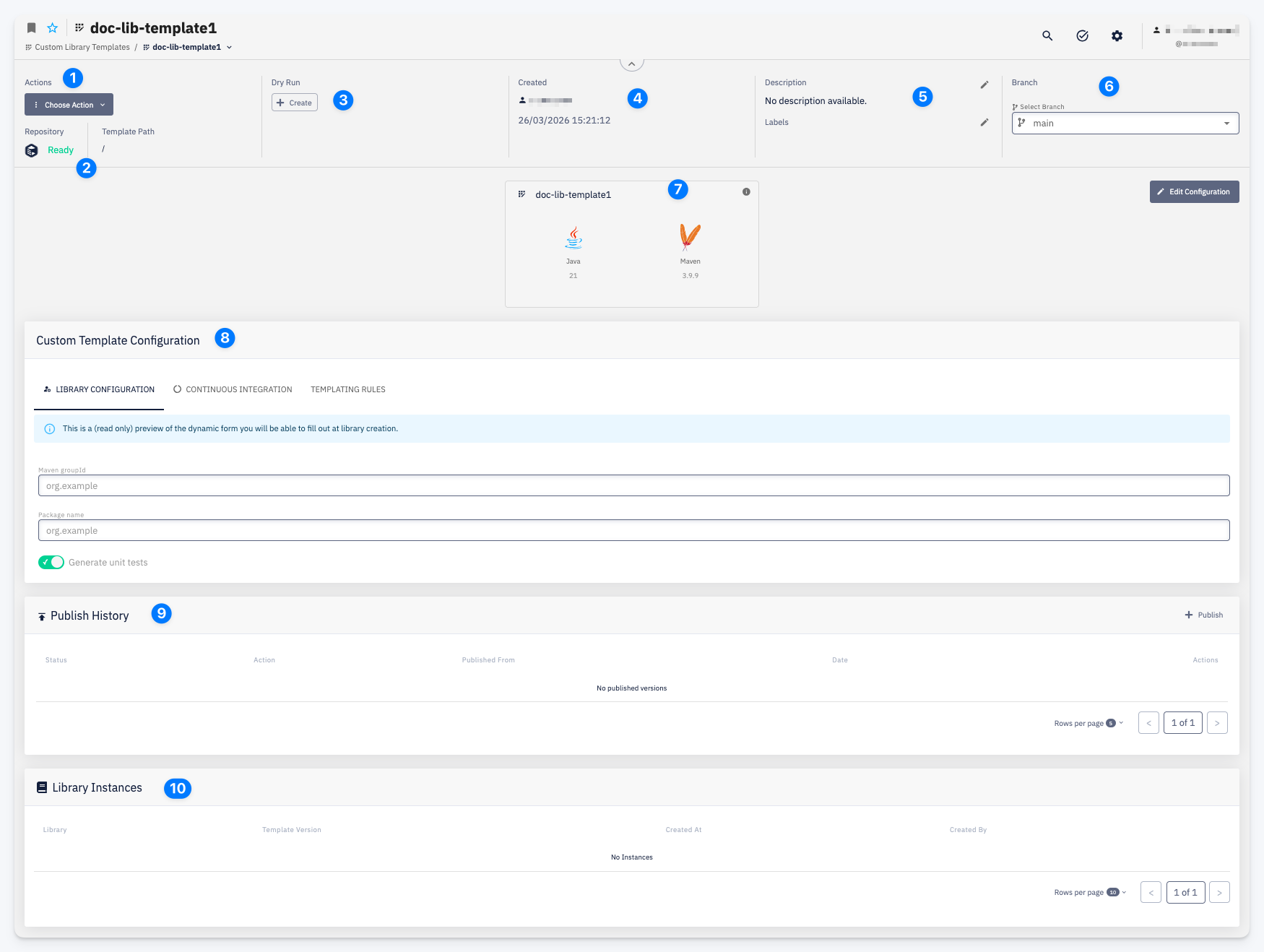
| # | Element | Description |
|---|---|---|
| 1 | Choose Action | Access available actions: Clone Repository, Dry Run, Publish, Settings |
| 2 | Repository | The template's Git repository with its current status |
| 3 | Dry Run | Shortcut to start a new Dry Run |
| 4 | Created | Who created the template and when |
| 5 | Description | Short description of the template (editable) |
| 6 | Branch | The active branch used for Dry Runs and publishing |
| 7 | Template Card | The template name, technology icons, and version numbers — editable via Edit → Template Card |
| 8 | Custom Template Configuration | Read-only preview of the template configuration across tabs: Template Configuration, Continuous Integration, Templating Rules — editable via Edit |
| 9 | Publish History | All published versions of the template with status, source branch, and date — use + Publish to publish a new version |
| 10 | Library Instances | All libraries that were created from this template, with their template version and creation date |