Service Templates
A Service Template defines the schema — the set of named variables — that any instance of a given technology will have, regardless of how that instance runs. For example, a PostgreSQL template might define variables such as Host, Port, Username, and Password. Every Hosted Service or Connected Service instance created for that technology is an instance of the same template, and holds its own values for those variables.
How it fits together
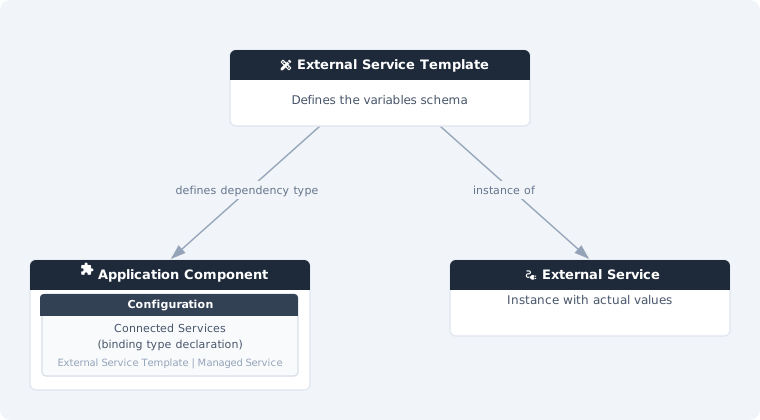
In the Component Detail, you add a Service Template as a Connected Service binding — this declares that the component requires a service matching that template at deployment time. There is a single binding type: it doesn't matter, at this point, whether the concrete instance will end up being hosted or connected. No concrete instance is assigned here.
The actual instance to use is then assigned per environment in the Deployment Configuration → Connected Services — and that instance can be either a Hosted Service or a Connected Service, chosen independently for each environment. For example, a dev environment might use a Hosted Service instance that CodeNOW provisions and runs, while prod connects to a Connected Service instance — both satisfy the same binding, because both are instances of the same (or a compatible/aliased) Service Template. This keeps the component decoupled from any specific environment's choice of instance and its values.
CodeNOW default templates
Alongside templates you create yourself, the list includes CodeNOW default templates for common technologies, marked with Source: Platform (your own templates show Source: Custom). They are read-only — they can't actually be edited or deleted, even though the row shows the same actions as any other template — but they are fully usable: you can create a Connected Service from a default template exactly like from your own. Marking a default template as a favorite still works, since it's a per-user preference and doesn't modify the template itself. The template's Settings page is accessible, but shows an informational message in place of the Permissions card.
Variable metadata
Each variable can carry, in addition to its name, description, and default value:
- Category and an order within it, used to group and order fields when the variable is rendered in a form
- A deprecated flag
- Per-variable optional and secret flags — available on your own templates as well as on CodeNOW default templates
Permission separation
A key purpose of this feature is separating two distinct permissions:
- Who can configure which service instance (hosted or connected) is used by a component
- Who can see the actual values (credentials, URLs) stored in that instance
A user who can assign a service instance to a component in its configuration does not automatically gain access to view the sensitive values stored in that instance. Permissions on templates and permissions on service instances are managed independently — and, for CodeNOW default templates, there is nothing to configure since the template itself is read-only.
What You Can Do
| Action | Description |
|---|---|
| List Service Templates | Browse and search all service templates, including CodeNOW default templates |
| Service Template Detail | View template variables and the components using this template |
| Delete Service Template | Permanently remove a template you created |
| Permissions | Manage who can access and modify the template |