Cluster Detail
The Cluster Detail page gives a full view of a single Dataplane — its configuration, resource utilization, and the list of nodes it consists of.
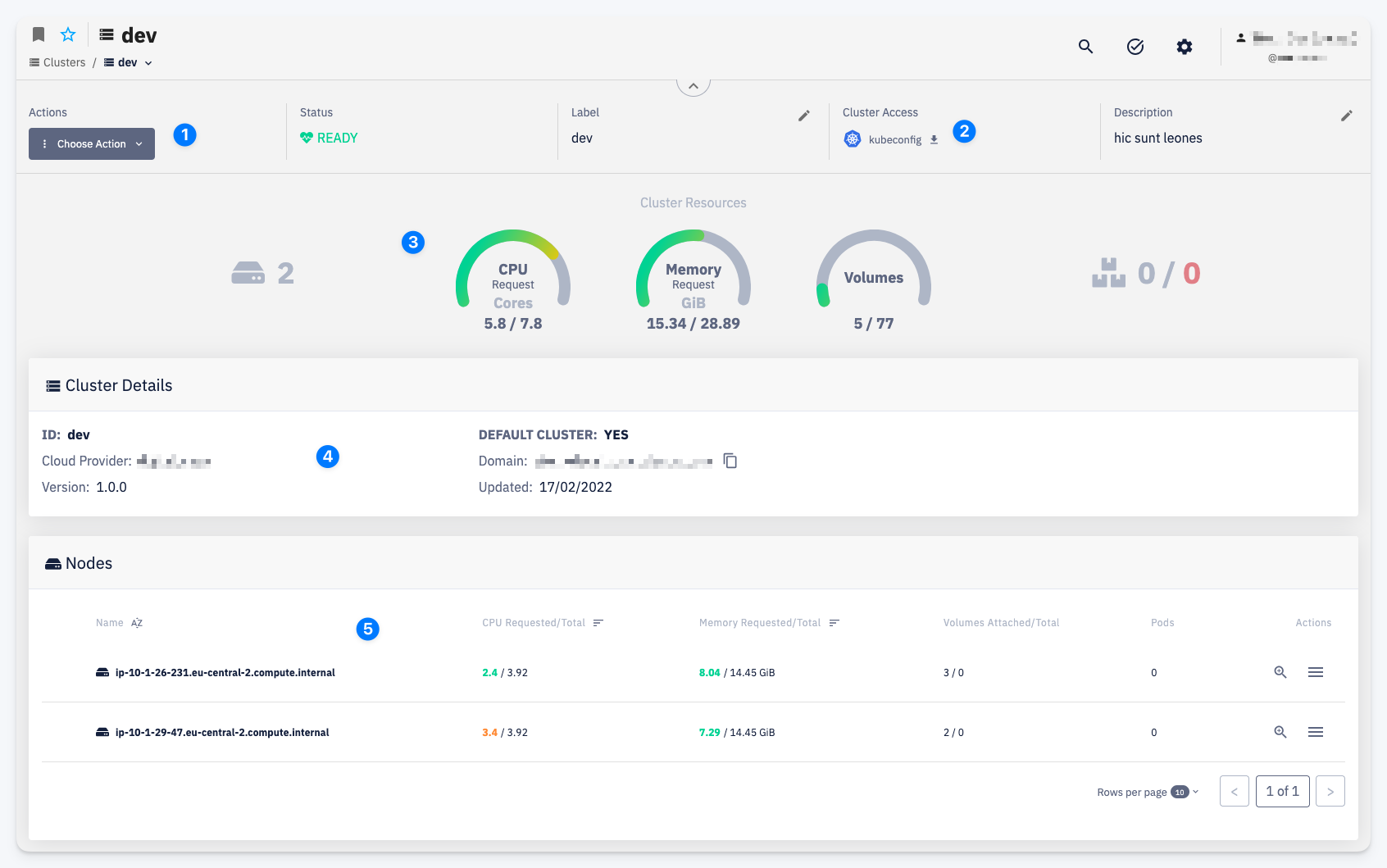
Actions
1 — The Choose Action menu provides access to cluster operations. The available action is:
- Settings — manage cluster permissions
Cluster Info
2 — The header bar shows key cluster attributes:
- Status — current readiness of the cluster (e.g. READY)
- Label — the display name of the cluster
- Cluster Access — a link to download the kubeconfig file for direct
kubectlaccess. For details on how cluster access works and what permissions are required, see User Access to CodeNOW Cluster - Description — a short description of the cluster
Cluster Resources
3 — An overview of current resource utilization across the entire cluster:
- Nodes — total number of nodes
- CPU Request — sum of CPU requests across all workloads vs. total cluster capacity (cores)
- Memory Request — sum of memory requests across all workloads vs. total cluster capacity (GiB)
- Volumes — persistent volumes in use vs. total available
- Pods without resource requests — pods that do not have CPU or Memory requests defined; highlighted in red when non-zero
Cluster Details
4 — Technical metadata about the cluster:
- ID — unique cluster identifier
- Cloud Provider — the underlying cloud infrastructure provider
- Version — the CodeNOW platform version running on this cluster
- Default Cluster — whether this cluster is the account's default Dataplane
- Domain — the base domain assigned to this cluster
- Updated — date of the last cluster configuration update
Nodes
5 — A table listing all nodes in the cluster. For each node you can see:
- CPU Requested / Total — CPU cores requested by workloads on this node vs. node capacity
- Memory Requested / Total — memory requested by workloads vs. node capacity
- Volumes Attached / Total — persistent volumes attached to this node
- Pods — number of pods running on the node