Agent Swarm List
Open AI › Agent Swarms in the main navigation. Like the application list, the agent swarm list presents each swarm as a card with an at-a-glance overview of its state and quick access to the most common actions.
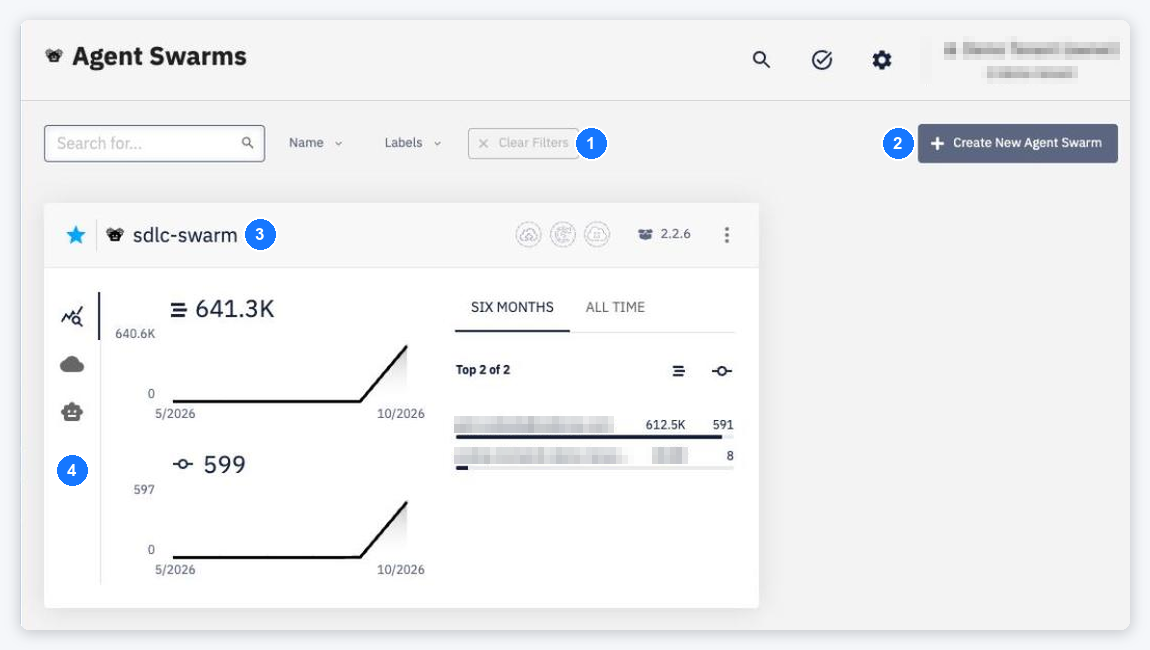
- Search and filters — search by name and filter by Name and Labels; Clear Filters resets them.
- Create New Agent Swarm — opens the create drawer. The button is disabled, with the reason in a tooltip, while the Agent Gateway is not available for the account.
- Card header — favorite toggle (star), the agent swarm icon and name, deployment status indicators, the currently active package version and the
⋮context menu. - Card views — the switcher at the left edge of each card shows Statistics (activity charts and the most active contributors), Deployments per environment, and Agents (columns Agent, Version, Quality, Coverage).
The card views work the same way as on the application cards — see Application List. The card's ⋮ menu offers Detail and Delete Agent Swarm. Without any swarm the page shows No Agent Swarms.