Agent Swarm Detail
-
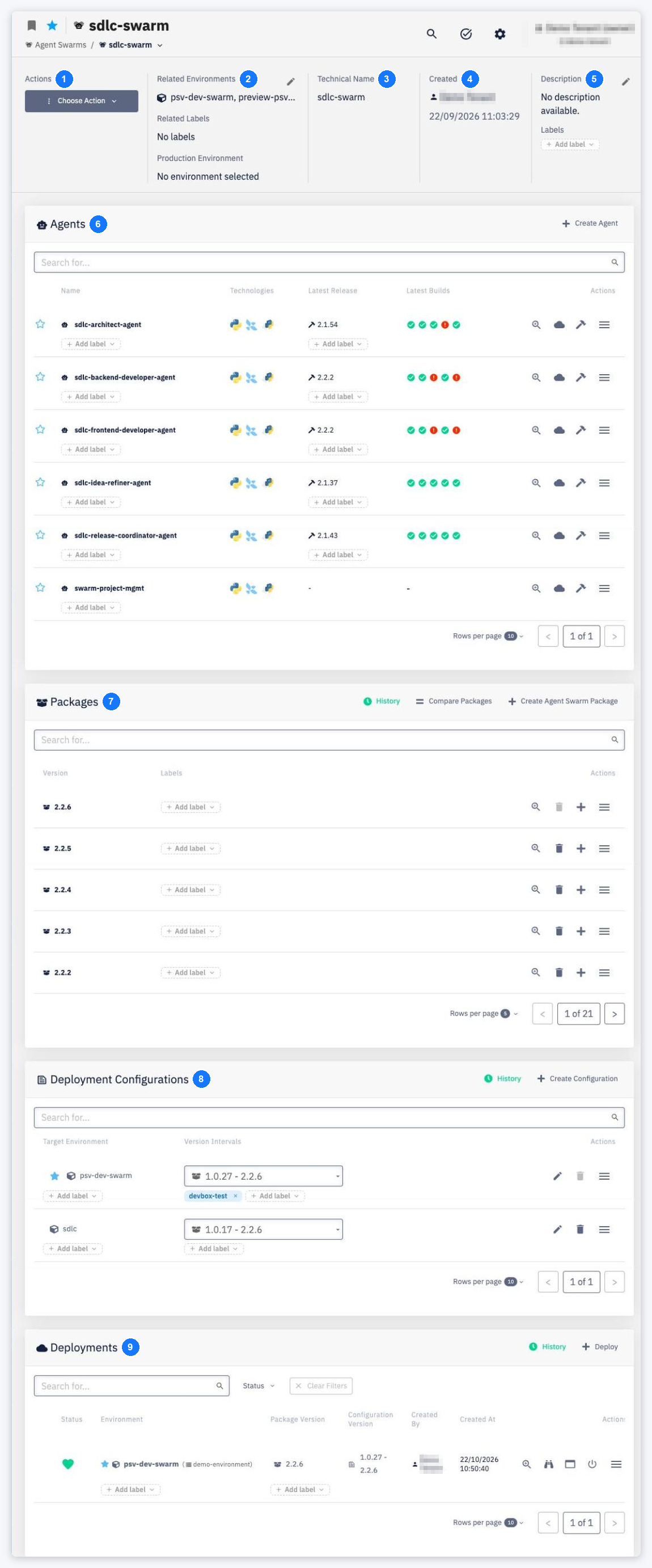
Actions — the Choose Action menu provides access to:
- Create New Agent — add a new agent to this swarm
- Create New Package — create a new agent swarm package
- Create New Configuration — create a new deployment configuration
- Deploy — deploy the swarm to an environment
- Settings › Permissions — manage who can access and modify the swarm (Permissions)
- Settings › Continuous Delivery — configure quality gates (Continuous Delivery)
- Delete Agent Swarm — permanently remove the swarm (Delete)
-
Related Environments / Related Labels / Production Environment — where the swarm can be deployed and which environment is treated as production. Use the pencil icon to edit.
-
Technical Name — the runtime name used in pipelines, configurations and Agent Gateway paths (
/agents/<swarm>/<environment>/<agent>). -
Created — the user who created the swarm and the creation date.
-
Description / Labels — a short description and labels attached to the swarm.
-
Agents — all agents of the swarm. Columns: Name, Technologies, Latest Release, Latest Builds, Actions. Use + Create Agent to add an agent. See Agents.
-
Packages — versions of the swarm. Each package captures the set of agent versions that make up a release. Use + Create Agent Swarm Package, Compare Packages and History (Agent Swarm Package History). See Packages.
-
Deployment Configurations — configurations that map package version intervals to a target environment. Columns: Target Environment, Version Intervals, Actions. Use + Create Configuration or History. See Deployment Configuration.
-
Deployments — active and historical deployments of the swarm. Use + Deploy or History; each deployment's
⋯menu offers Redeploy and Undeploy. See Deployments.