Create Agent Swarm
To create a new agent swarm, click + Create New Agent Swarm on the Agent Swarm List. The drawer Configure New Agent Swarm opens.
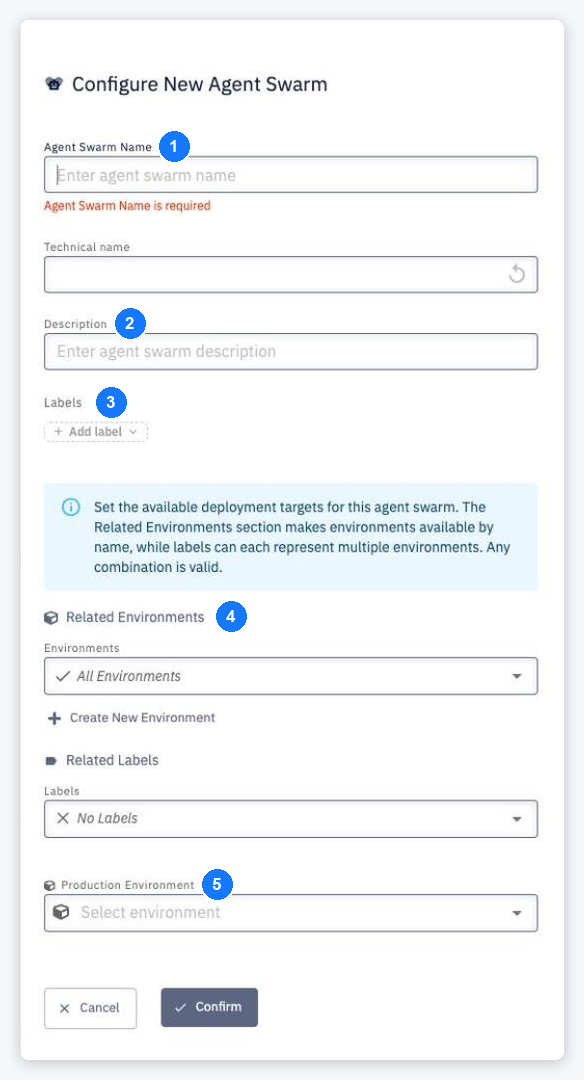
- Agent Swarm Name — a human-readable name. The runtime name (technical name) is derived from it and used in pipelines, configurations and Agent Gateway paths. Both must be unique.
- Description — optional.
- Labels — labels attached to the swarm.
- Related Environments / Related Labels — Set the available deployment targets for this agent swarm. The Related Environments section makes environments available by name, while labels can each represent multiple environments. Any combination is valid. By default All Environments and No Labels. + Create New Environment creates a missing environment.
- Production Environment — the environment treated as production for DORA metrics and other indicators.
Click Confirm. After the snackbar Agent Swarm <name> was created successfully… CodeNOW continues directly to creating the first agent. Validation messages include Agent Swarm Name is required and Agent Swarm with this name already exists.
info
Creating agent swarms requires the Agent Gateway to be enabled and installed for the account, and the Agent Swarm Creator account permission (account Owners and Admins have it implicitly).