Preview Configuration
A Preview Configuration is a temporary deployment configuration created automatically after a successful preview build is deployed to an environment. It holds the environment-specific values used to run the preview version of the component alongside (or instead of) the currently deployed release.
How it is created
The way the preview configuration is created depends on what is currently deployed on the target environment:
No deployment exists for the environment
If the environment has no active deployment at all, CodeNOW creates a new preview configuration pre-populated from the component defaults — the configuration values stored with the component version on the branch that was built.
A release version is deployed
If a release package is currently deployed, CodeNOW creates a preview configuration as a copy of the deployment configuration used by that release. The preview version of the component then runs with the same environment-specific values as the release.
A preview version is already deployed
If a preview deployment is already active on the environment, CodeNOW reuses the existing preview configuration — no new configuration is created. To change its values, use the standard configuration editing mechanisms; the preview configuration appears as a regular interval in the deployment configuration list.
Component not present in the deployed version
In any of the above cases, if the currently deployed version (release or preview) does not include the component being deployed in preview mode, the preview configuration is enriched with the component defaults from the branch that was built. This ensures the component has a valid starting configuration even though no environment-specific values exist for it yet.
Editing the configuration at build time
When triggering a preview build, the build dialog shows a configuration summary for each selected deployment target. This lets you review and adjust the preview configuration directly before the build is confirmed — without having to open the Configuration Detail separately afterwards.
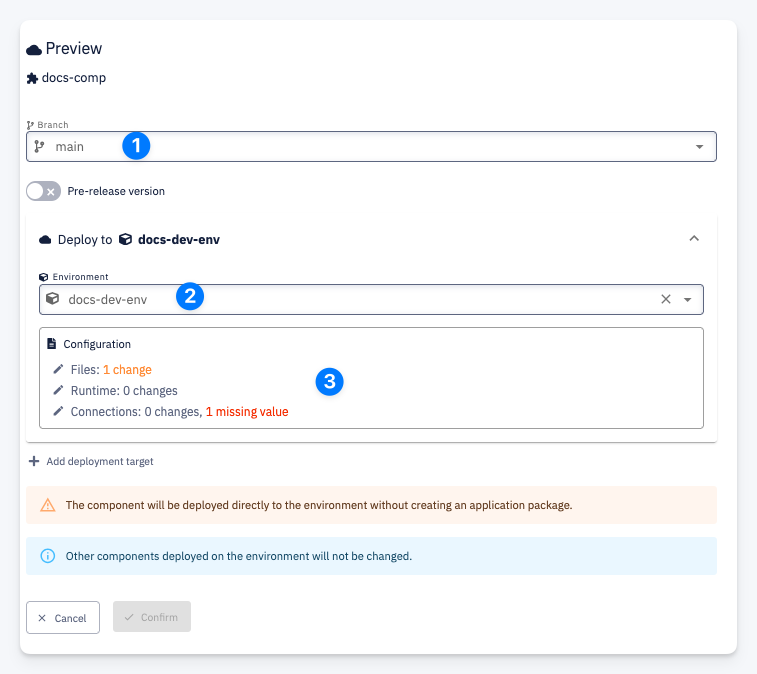
| # | Element | Description |
|---|---|---|
| 1 | Branch | The branch to build the preview from. The component defaults used for configuration pre-population come from this branch |
| 2 | Environment | The target environment to deploy to. Multiple environments can be added with + Add deployment target |
| 3 | Configuration | Summary of differences between the branch configuration and the configuration currently in use on the environment. Shows the number of changed files, runtime changes, and missing or changed connected service values. Expanding this section allows editing the values directly — confirming the form creates or updates the preview configuration for the selected environment |
Changes made through this form are applied to the preview configuration for that environment. They do not affect the release deployment configuration.
Lifecycle
The preview configuration exists only for the duration of the preview deployment on the given environment. It is automatically deleted when the preview is undeployed or when the environment is redeployed with a release version.
While it exists, it behaves like any other deployment configuration interval — it can be viewed, edited, and compared using the standard Configuration Detail page. It does not affect the release deployment configuration in any way.