Application Components
An Application Component is the fundamental runnable artifact in CodeNOW. It represents a single deployable service — a microservice, background worker, frontend application, or any other independently buildable and runnable unit.
What is an Application Component?
An application component is a standalone code project managed within CodeNOW that produces a runnable artifact deployed into an environment. Each component has its own Git repository, build pipeline, and runtime configuration.
Unlike Libraries (which produce reusable packages consumed by other components) or Containers (which produce base Docker images), an application component is deployed and runs as a live service inside a cluster.
Components are always grouped under an Application, which acts as the deployable unit. An application packages the component versions together and deploys them as a whole.
Typical examples:
- A REST API backend service
- A frontend web application
- A background job worker
- An event consumer or message processor
Repository Structure
CodeNOW expects the following structure in the component's Git repository:
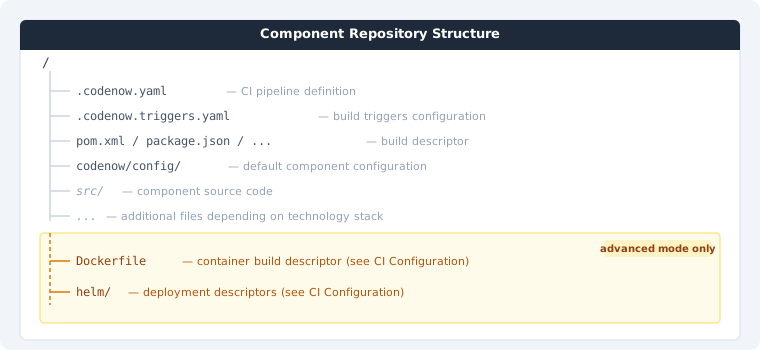
For monorepo setups, the entire structure above is nested within a subdirectory of the repository. Configure the path in Git Settings when creating or editing the component.
.codenow.yaml— CI pipeline definition used by CodeNOW to build the component.codenow.triggers.yaml— configures when builds are triggered (branches, events)- Build descriptor (
pom.xml,package.json, etc.) — standard build file for the component's technology stack codenow/config/— holds the default configuration of the component; see Configuration for detailssrc/— component source code...— additional files and directories depending on the chosen technology stackDockerfile— container build descriptor; present only when advanced mode is enabled in CI Configurationhelm/— Helm deployment descriptors; present only when advanced mode is enabled in CI Configuration
What You Can Do
| Action | Description |
|---|---|
| Create a new component | Select a name and technology template to create a component |
| View component detail | See component info, repository status, and available actions |
| Open / Clone repository | Access the component's Git repository for local development |
| Setup instructions | View instructions for setting up the component in your IDE |
| Manage merge requests | Create and review merge requests for the component repository |
| Manage permissions | Control who can view, develop, or administer the component |
| Configure CI | Set the build image, CI provider, environment variables, and branch settings |
| Configuration | Manage runtime configuration — configuration files, environment variables, Helm values, and runtime settings |
| Delete component | Permanently remove the component and its repository |