Trigger a Release
You can trigger a release build from the Container Detail page. A release build compiles the Dockerfile and publishes a versioned container image to the registry that other components can reference as a base image.
How to Trigger a Release
Click + New Release in the Build History section, or select Release from the Choose Action dropdown.
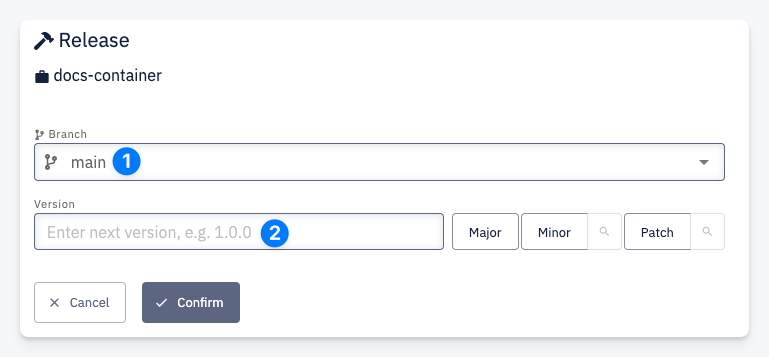
- Branch — select the branch to build the release from (e.g.
main) - Version — CodeNOW tracks all previously released versions of the container, so you don't need to remember the current version. Simply click Major, Minor, or Patch to bump the appropriate part of the version number according to semantic versioning — CodeNOW computes the next version automatically. You can also enter a custom version manually.
If you use the branch naming pattern release/<major>.<minor> (e.g. release/1.2), CodeNOW automatically calculates the next patch version for that branch.
Click Confirm to start the release build. The build progress and result are visible in the Build History section on the container detail page.
Incomplete Build
A container release build is marked as Incomplete when the CI pipeline does not produce all required results. For containers, the required results are container and git-tag. See Incomplete Build for details on how to resolve this.