Link Existing Source Code
Use this variant when you already have source code in an existing repository and want to connect it to CodeNOW. No template scaffolding is performed — CodeNOW links directly to the existing code.
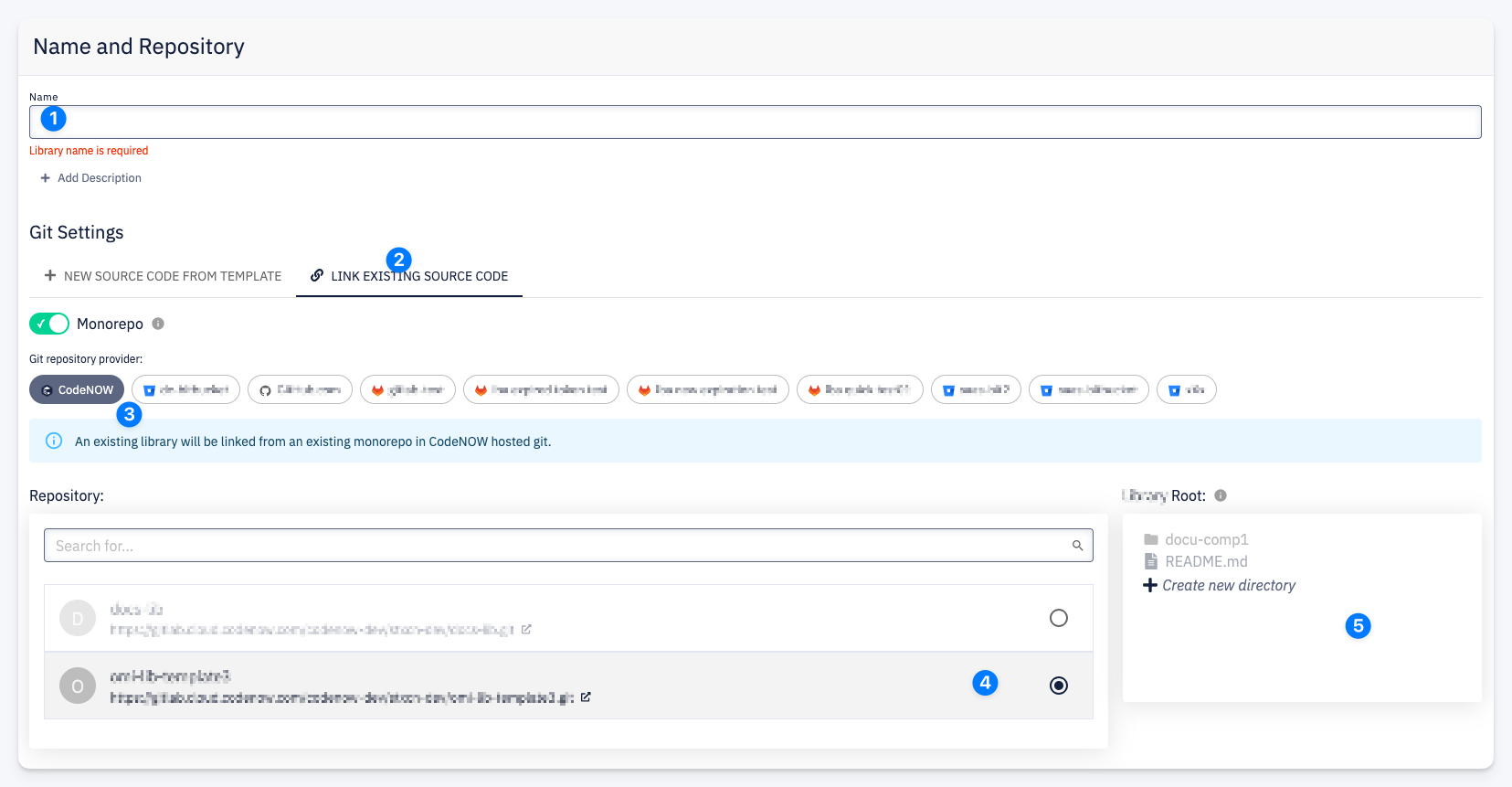
- Name — enter the resource name.
- Link Existing Source Code — the active tab. This tells CodeNOW to skip template scaffolding and connect to existing code.
- Git repository provider — select the provider where the repository is hosted. The Monorepo toggle is automatically enabled.
- Repository — search and select the repository containing the source code.
- Root Path — browse the repository structure and select the directory where the resource's code is located.
What Happens After Confirmation
- CodeNOW links the resource to the selected repository and root path
- No code is generated or modified — the existing source code is used as-is
- CI pipelines and other CodeNOW features become available for the linked resource
tip
Ensure the repository already contains a valid project structure for the selected resource type (e.g. a pom.xml for Java, a .csproj for .NET).
tip
The list of available Git providers is managed by your account administrator. Contact them to add new providers or configure which providers are available for creating new resources.