New Source Code in a New Repository
Use this variant when you want CodeNOW to create a new dedicated Git repository and populate it with code from the selected template (scaffolder). This is the most common option for starting a new project from scratch.
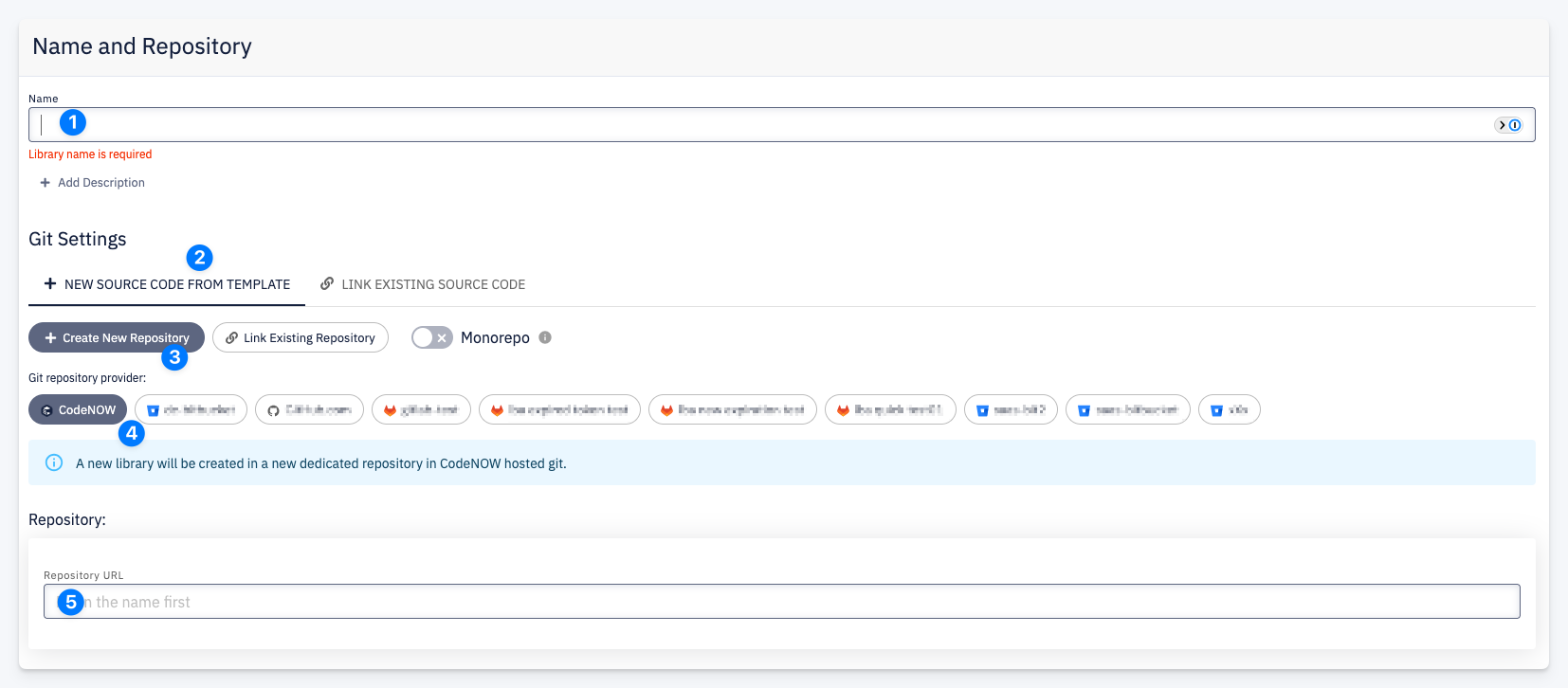
- Name — enter the resource name. The repository name is derived from it. Optionally click + Add Description.
- New Source Code from Template — the active tab, indicating that a template will be used to scaffold the initial source code.
- Create New Repository — creates a new dedicated repository for this resource. The Monorepo toggle is disabled — each resource gets its own repository.
- Git repository provider — select the hosting provider where the repository will be created. The default is CodeNOW hosted Git. Other configured providers (e.g. GitHub, GitLab, Bitbucket) are shown as tiles.
- Repository URL — auto-generated based on the resource name and selected provider. Fill in the name first to see the URL.
What Happens After Confirmation
- A new Git repository is created on the selected provider
- The template scaffolder generates the initial source code and pushes it to the repository
- The resource is linked to the repository and ready for development
tip
When using CodeNOW hosted Git, the repository is created and fully managed by the platform automatically.
tip
The list of available Git providers is managed by your account administrator. Contact them to add new providers or configure which providers are available for creating new resources.