New Source Code in an Existing Repository
Use this variant when you want CodeNOW to scaffold code from a template but place it inside an existing repository alongside other components. This is the monorepo approach — multiple resources share the same Git repository, each in its own directory.
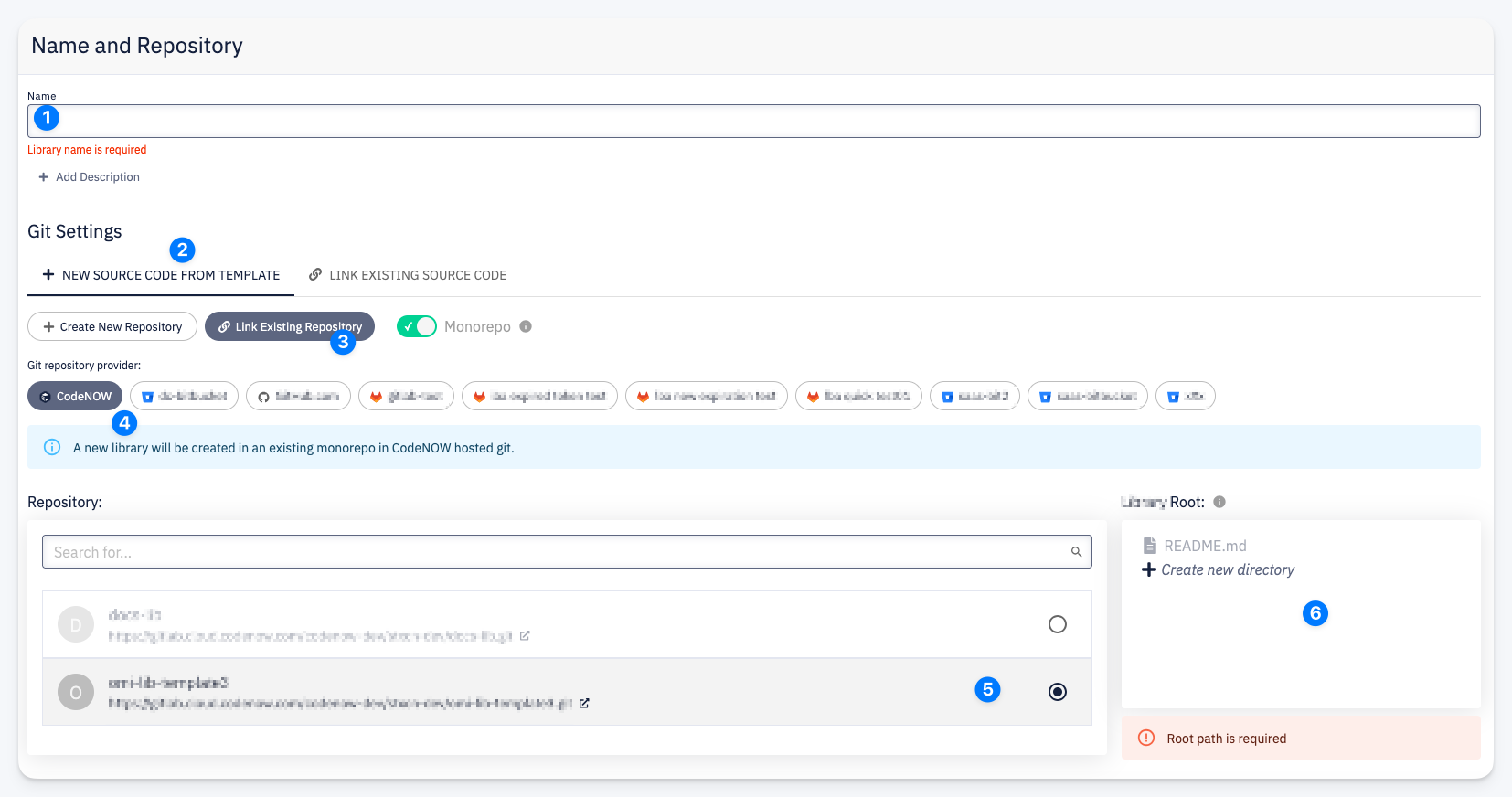
- Name — enter the resource name.
- New Source Code from Template — the active tab, indicating that a template will scaffold the initial source code.
- Link Existing Repository — links to an existing repository instead of creating a new one. The Monorepo toggle is automatically enabled.
- Git repository provider — select the provider where the existing repository is hosted.
- Repository — search and select from a list of existing repositories on the selected provider. Each entry shows the repository name and URL.
- Root Path — a file browser showing the repository structure. Select or create the directory where the resource's code will live. Click + Create new directory to add a new folder.
What Happens After Confirmation
- The template scaffolder generates the initial source code and pushes it into the selected directory within the existing repository
- The resource is linked to the repository with the specified root path
- Other resources in the same repository are not affected
info
Each resource in a monorepo must have its own dedicated directory. The root path uniquely identifies where the resource's code lives within the shared repository.
tip
The list of available Git providers is managed by your account administrator. Contact them to add new providers or configure which providers are available for creating new resources.