Domain Detail
The Domain Detail page shows the current state of a gateway — its DNS resolution status, configuration, and active routing rules.
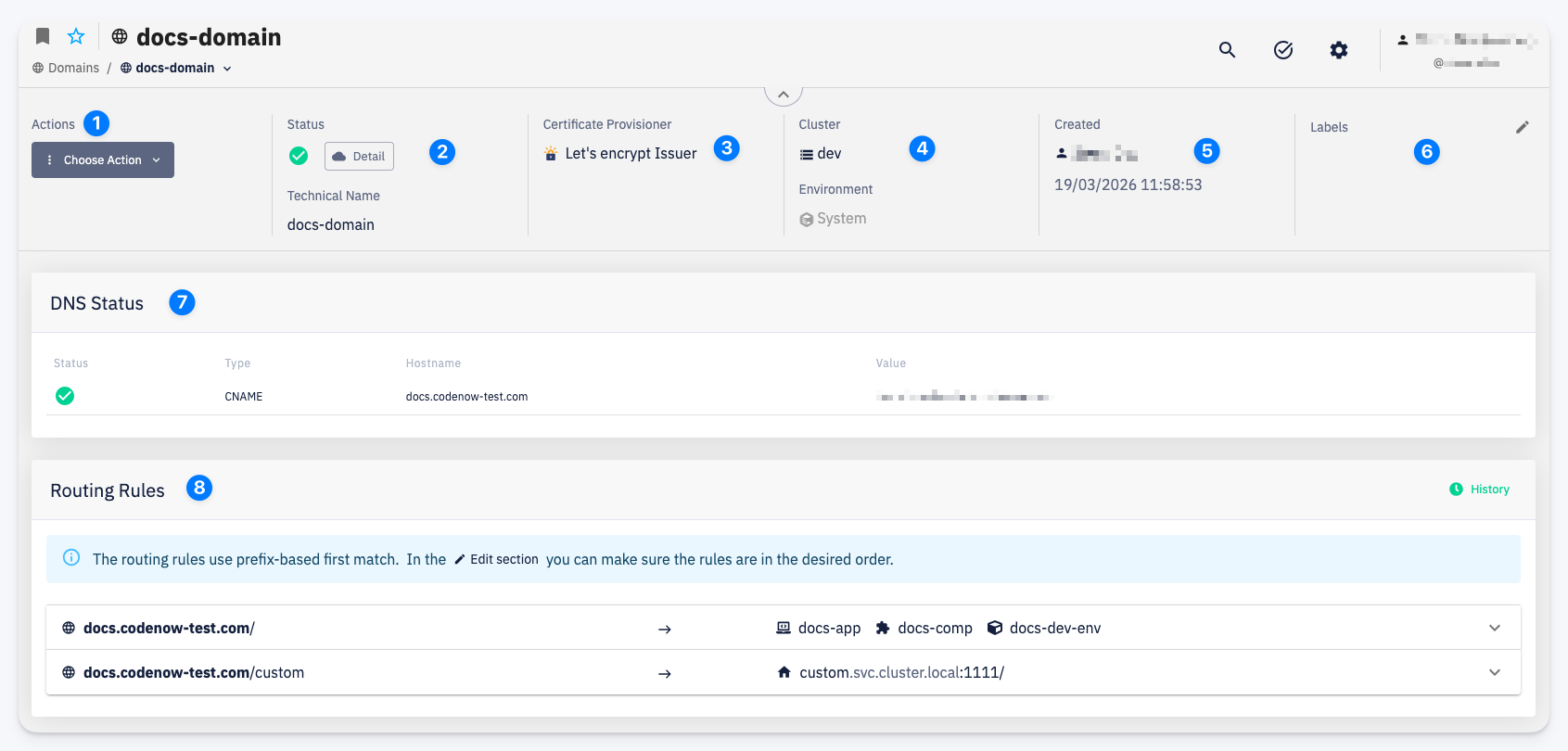
Actions
1 — The Choose Action menu provides access to domain operations:
- Edit — modify the gateway configuration and routing rules; see Edit Domain
- Settings > Permissions — manage access; see Permissions
- Delete — permanently remove the domain
Domain Info
2 — Status / Technical Name — current health of the gateway and its internal technical name; the Detail button opens the raw status from the service mesh
3 — Certificate Provisioner — the TLS certificate mode (e.g. Let's Encrypt Issuer)
4 — Cluster / Environment — the cluster this gateway runs on and the environment it is attached to
5 — Created — who created the domain and when
6 — Labels — editable labels for the domain
DNS Status
7 — Shows the DNS records that need to be configured at your registrar, and their current resolution status. A green check indicates the record is correctly propagated.
Routing Rules
8 — The list of active routing rules in evaluation order. Each rule shows the matched path prefix and its destination. The History button opens the change history for routing rules on this domain.