Clone repositories as a service account
A CI pipeline, a mirror script or another tool that needs a CodeNOW repository should not use a person's credentials. Give it Git access as a service account instead: it clones and pushes with the service account's permissions, only in repositories those permissions cover, and keeps working when people leave.
Only the service account's owner creates its Git credentials: the owning user, or for a team-owned service account the team's Admins and Service Account Managers. Account Owners and Admins who are not the owner can view, revoke and delete them, but not create new ones. Others don't see the KEYS & TOKENS tab. See Who manages a service account.
Git accepts only the credentials on the Git access card: an HTTPS token or an SSH key. CodeNOW API keys don't work for Git — they are for the CodeNOW API, CLI and MCP server.
The examples use <your-git-host> for the Git server of your CodeNOW installation; it differs per installation. Copy a repository's real address from its Clone dialog in CodeNOW.
Overview
- Create an HTTPS token on the service account's KEYS & TOKENS tab.
- Store it as a CI secret.
- Clone through a credential helper — never put the token into the URL.
- Rotate it before it expires — nobody is e-mailed for service account tokens.
1. Create an HTTPS token
-
Open the service account (Profile › SERVICE ACCOUNTS or Account Settings › SERVICE ACCOUNTS) and go to the KEYS & TOKENS tab.
-
On the Git access card, select the HTTPS tokens tab and click Create token.
-
Fill in the Create HTTPS token drawer:
Field What to choose Name Something you will recognise later, for example github-actionsormirror-script. Up to 100 characters, unique (ignoring case) among the service account's active tokens.Repository access Read — clone and fetch. Read & write — also push branches and tags. Pick the least access the tool needs. GitLab API (optional) Read API — read-only GitLab API. Full API — includes Read API. Leave both unchecked for plain cloning and pushing. Expires 30 days, 90 days (default), 365 days or Custom date (from tomorrow). Required. At most 365 days by default — your installation may set a lower maximum, and presets above it are hidden. Full APIFull API can change project settings, members and CI variables wherever the service account has Maintainer access, and can create further tokens. Choose it only if a tool really needs it — cloning and pushing never do.
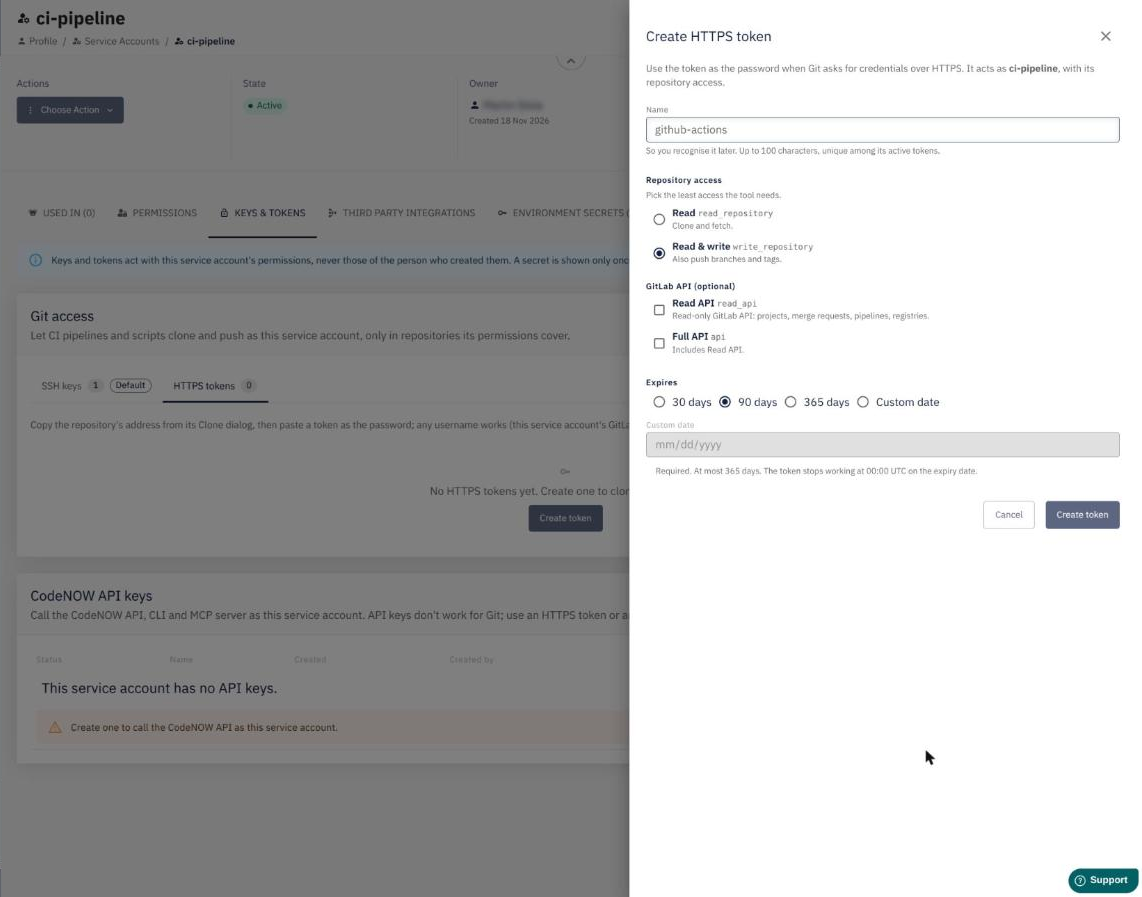
-
Click Create token. The HTTPS token created dialog shows the token only once: copy it and store it straight away (next step). Once you close the dialog it can't be shown again — if you lose it, revoke it and create a new one. Under How to use it the dialog shows a credential-helper example with your installation's real host; the CI example button on the HTTPS tokens tab shows it again later.
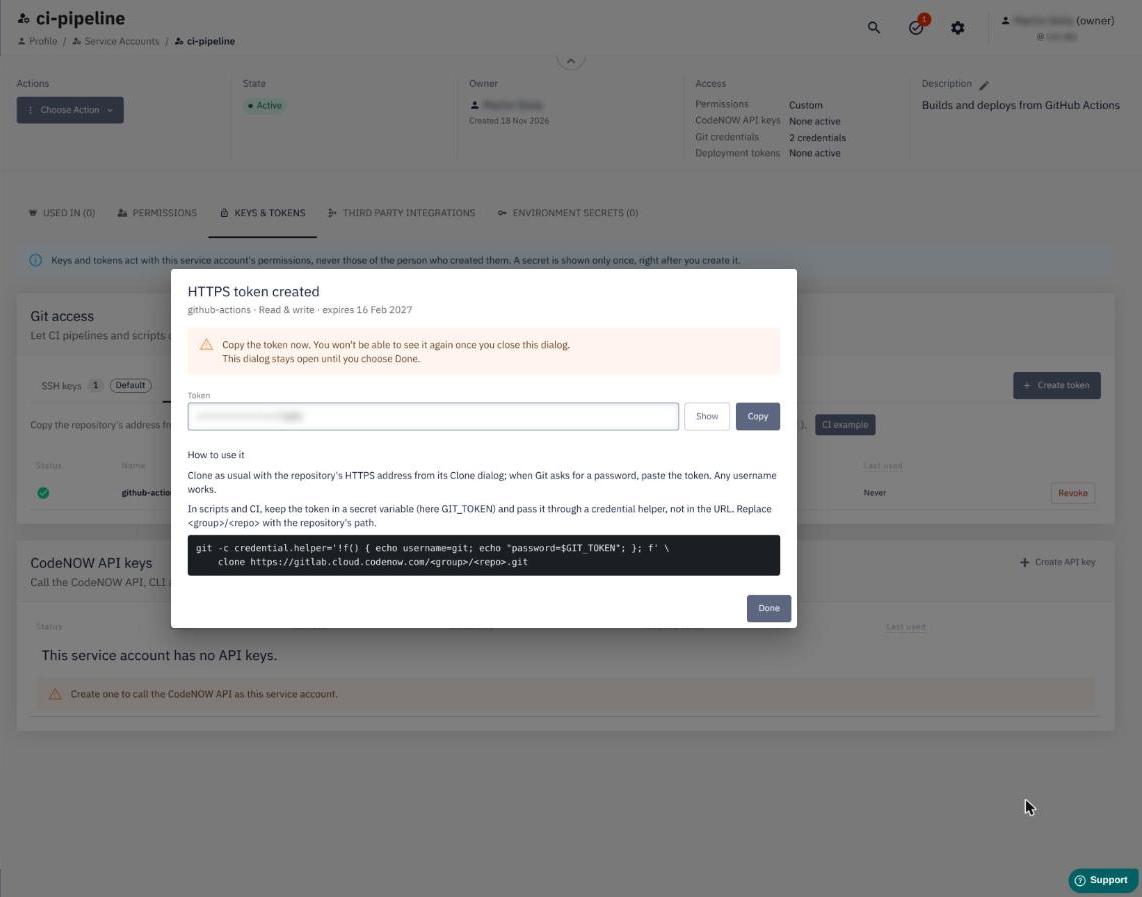
The HTTPS tokens tab also shows the service account's GitLab username, for information only: any username works, the token is what authenticates.
2. Store the token as a CI secret
Keep the token only in your CI system's secret store, never in the repository, a script or a pipeline file:
- GitLab CI — Settings › CI/CD › Variables, masked (and protected if only protected branches use it), for example
CODENOW_GIT_TOKEN. - GitHub Actions — Settings › Secrets and variables › Actions, for example
CODENOW_GIT_TOKEN. - Other CI or a script — your tool's secret store, exposed to the job as the environment variable
CODENOW_GIT_TOKEN.
3. Clone through a credential helper
Clone over HTTPS and let a credential helper hand the token to Git as the password. The token stays in the environment variable: it never appears in the clone URL, in .git/config, in git remote -v or in the job log.
Don't write the token into the clone address. A token in a URL ends up in .git/config, shell history, CI logs and error messages.
Replace <group>/<repo> with the repository's path from its Clone dialog.
- Shell
- GitLab CI
- GitHub Actions
# CODENOW_GIT_TOKEN comes from your secret store
git -c credential.helper='!f() { echo username=git; echo "password=$CODENOW_GIT_TOKEN"; }; f' \
    clone https://<your-git-host>/<group>/<repo>.git
clone-codenow-repo:
  script:
    - |
      git -c credential.helper='!f() { echo username=git; echo "password=$CODENOW_GIT_TOKEN"; }; f' \
        clone https://<your-git-host>/<group>/<repo>.git
- name: Clone CodeNOW repository
  env:
    CODENOW_GIT_TOKEN: ${{ secrets.CODENOW_GIT_TOKEN }}
  run: |
    git -c credential.helper='!f() { echo username=git; echo "password=$CODENOW_GIT_TOKEN"; }; f' \
      clone https://<your-git-host>/<group>/<repo>.git
The single quotes matter: Git runs the helper and expands $CODENOW_GIT_TOKEN only when it needs the password. (The dialog in CodeNOW uses the variable name GIT_TOKEN; any name works.)
git -c … applies to that one command. If the job later fetches or pushes (with a Read & write token) in the cloned repository, set the same helper in the repository's own config — the config then holds the helper, not the token:
cd <repo>
git config credential.helper '!f() { echo username=git; echo "password=$CODENOW_GIT_TOKEN"; }; f'
git push origin HEAD
Alternative: SSH keys
If your tooling prefers SSH, add a key instead of a token:
-
Generate a key pair for the tool, for example
ssh-keygen -t ed25519 -f codenow_ci -N '' -C ci-bot. -
On the service account's KEYS & TOKENS tab, select SSH keys on the Git access card and click Add SSH key. Give it a Name, paste the public part only (
codenow_ci.pub, starting withssh-ed25519orssh-rsa) into Public key and set Expires — required for service account keys, with the same presets and maximum as tokens.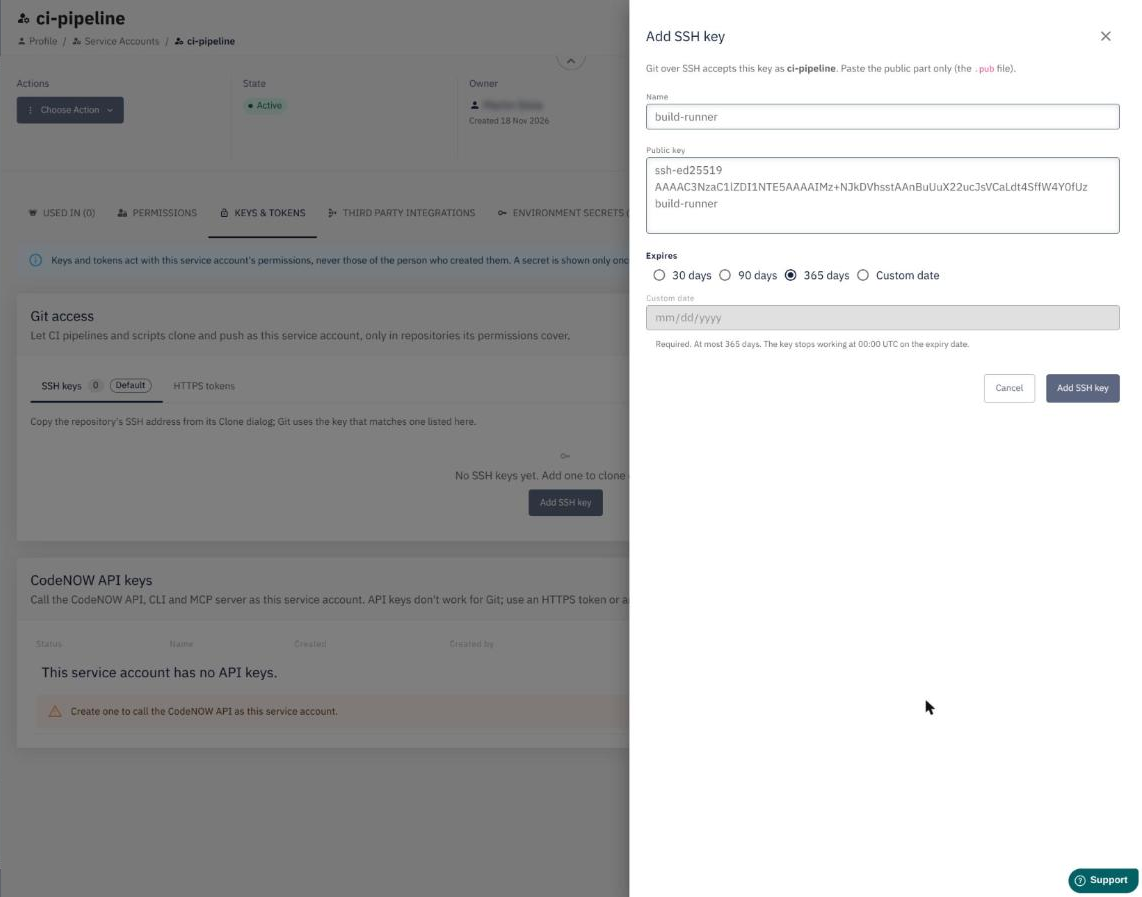
-
Store the private key as a CI secret and load it into
ssh-agentin the job. Clone with the repository's SSH address from its Clone dialog, for examplegit clone git@<your-git-host>:<group>/<repo>.git.
A key can belong to one GitLab user only; a key that is already in use is refused with already used by another GitLab user. An SSH key gives repository access only — use an HTTPS token if the tool also needs the GitLab API.
One of the two tabs is marked Default — the account's default clone protocol. It is set per account by CodeNOW (HTTPS unless configured otherwise); both protocols work either way.
Expiry and rotation
A token or SSH key stops working at 00:00 UTC on its expiry date. Nobody is e-mailed when a service account's token or key is about to expire — not the owner, not the managers. Watch the Expires soon marker and rotate by hand.
From 14 days before expiry, CodeNOW marks the credential:
- its row on the KEYS & TOKENS tab shows a warning icon, the status Expires soon and the date as <date> · in N days (or today);
- the HTTPS tokens or SSH keys tab gets a warning icon;
- the Git credentials column of the service accounts list and the Git credentials line of the service account's Access tile show expires in N days with a warning icon.
To check all service accounts at once — for example in a scheduled job — use the credential audit (expiresWithinDays=14).
To rotate without an outage:
- Create token with the same access and a new expiry.
- Replace the CI secret's value with the new token.
- Run the pipeline once to confirm it clones.
- Revoke the old token.
Last used (reported by GitLab; it can lag by a few minutes) helps to tell whether an old token is still needed. Created by shows who created each credential.
Tokens created outside CodeNOW
A service account's list also shows tokens that were created directly in GitLab (for example by rotating a token through the GitLab API), flagged Created outside CodeNOW. Review them and revoke any token nobody expects. (On a person's own Keys & tokens page only tokens created in CodeNOW are listed.)
Revoking
Click Revoke on a token's row (or Delete on an SSH key's row) and confirm. Anything using it loses Git access immediately; this can't be undone. Show revoked tokens (N) lists revoked tokens when there are any.
Revoke all deployment tokens in the service account's actions menu does not touch Git credentials — it revokes only the tokens CodeNOW issued to deployments. Revoke Git tokens and SSH keys one by one.
When the service account is disabled or deleted
| Service account state | Git access |
|---|---|
| Disabling… / Disabled | Git access stops as soon as the service account's GitLab user is blocked, normally within seconds: its tokens and SSH keys are refused. While it is disabled, no new tokens or keys can be created; revoking existing ones still works. |
| Enabling… / Active again | Tokens and keys that haven't expired or been revoked work again. |
| Deleting… / deleted | All Git tokens and SSH keys are revoked and the service account's GitLab user is removed. |
Troubleshooting
| Symptom | Check |
|---|---|
Authentication failed / HTTP 401 | The token expired (00:00 UTC on its expiry date) or was revoked, the service account is disabled, or an API key was used instead of an HTTPS token. |
repository not found / HTTP 403 or 404 | The service account's permissions don't cover that repository, or the token has Read access and the job pushes. |
| Git prompts for a password in CI | The secret variable is empty in that job (for example a protected variable on an unprotected branch) or the credential helper is missing. |