Create Agent
To create a new agent, open the agent swarm detail and select Choose Action › Create New Agent (or + Create Agent in the Agents card).
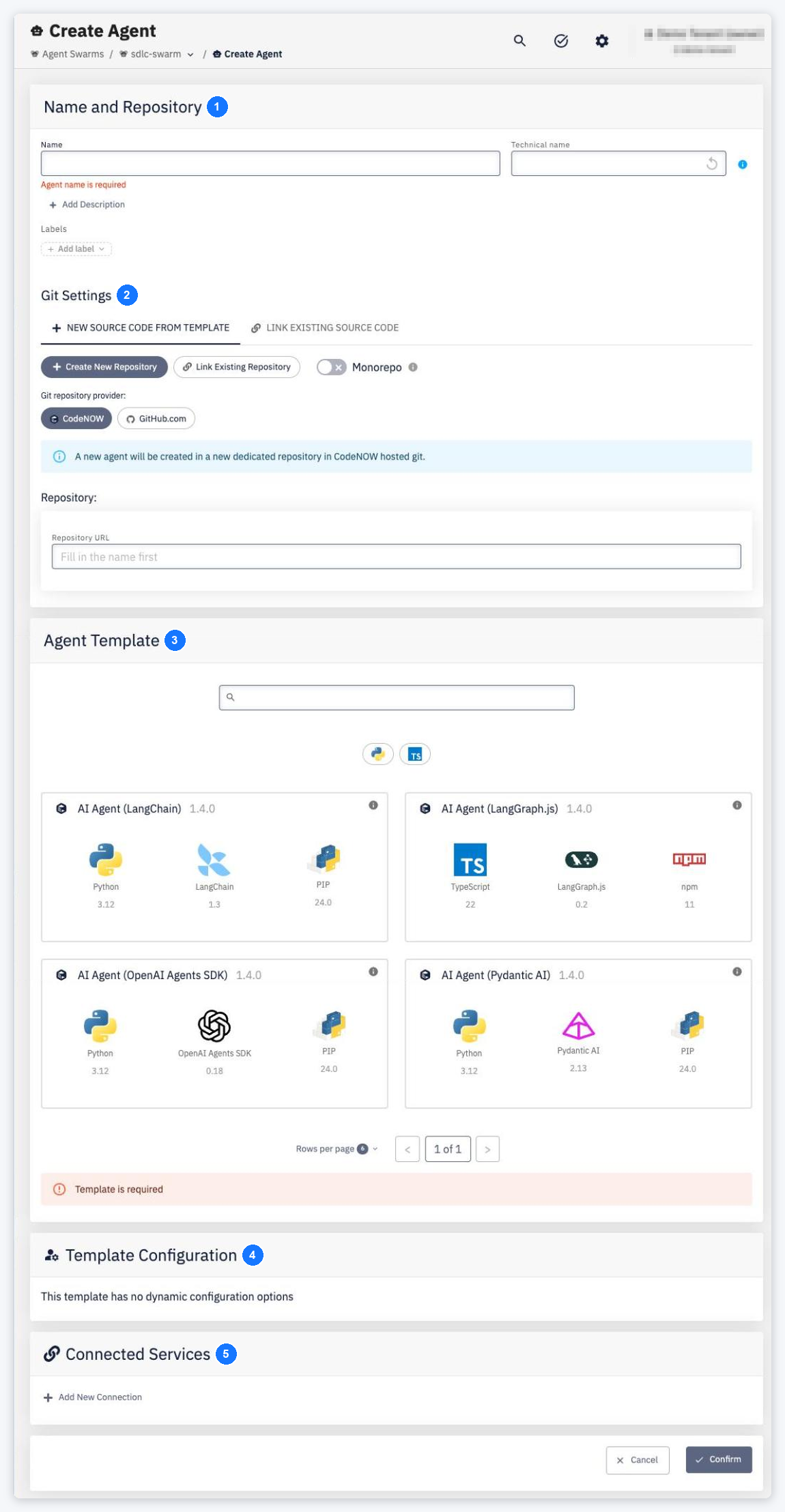
- Name and Repository — the agent name and its technical name (both unique within the swarm). Use + Add Description to add a description.
- Git Settings — New Source Code from Template or Link Existing Source Code, the Git provider and repository, and Monorepo if the agent shares a repository.
- Agent Template — the technology template of the agent (for example AI Agent (LangChain)). It defines the stack, the project structure and the default
.codenow.config.yaml. - Template Configuration — options specific to the selected template.
- Connected Services — optional bindings to Service Templates; instances are assigned per environment.
Click Confirm. While the Agent Gateway is not enabled for the account, the page shows Agent Gateway is not enabled for this account. Enable it in Account Settings before creating an agent. and Confirm stays disabled. A repository used by another agent is rejected (Selected repository is used in another agent.).