Connected Services
A Connected Service is a connection to a service running outside the platform — CodeNOW doesn't provision or run anything for it; it only holds the record and the actual connection values (such as credentials or a connection URL) needed to reach it. It's a named instance of a Service Template, which defines the schema — which variables exist — while the Connected Service holds the values.
Connected Services allow you to connect third-party services — or platform-external instances of the same technologies CodeNOW can also host — to your application components without exposing raw credentials in component configuration. Templates you can instantiate from include both your own templates and the read-only CodeNOW default templates; see Service Templates for details.
In the Component Detail, a Service Template is added as a Connected Service binding — declaring that the component requires a service matching that template at deployment time. There's a single binding type; it isn't tied to hosted or connected. The concrete instance to use is then assigned per environment in the Deployment Configuration → Connected Services — and each environment can independently use either a Connected Service or a Hosted Service instance of that template. For example, dev might use a Hosted Service instance that CodeNOW provisions and runs, while prod connects to a Connected Service instance — both satisfy the same binding.
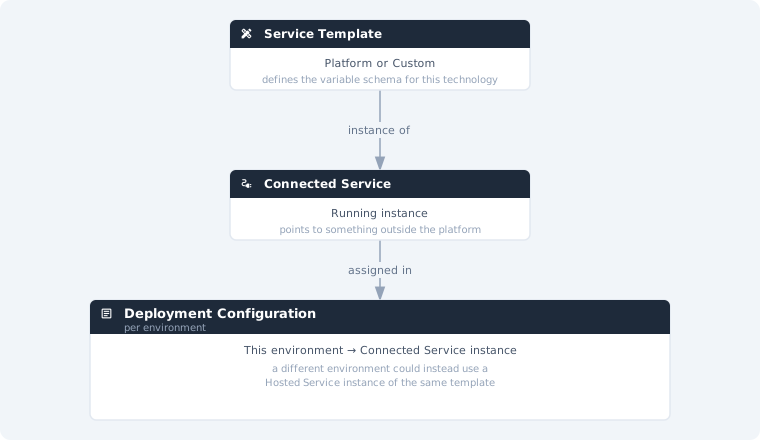
What sets a Connected Service apart from a Hosted Service is what gets created: a Connected Service is only a record of a connection to something running elsewhere, while a Hosted Service instance is provisioned and run by CodeNOW itself.
Benefits
- Grouped configuration — all variables belonging to a connection (e.g. host, port, credentials) are bundled into a single service instance and assigned as one unit in the component configuration, rather than setting individual variables one by one
- Reusability — the same service instance can be assigned to multiple components or environments without duplicating values
- Permission separation — access to assign a service to a component is independent from access to view or edit the actual variable values (see below)
Permission separation
Access to a Connected Service is controlled independently from access to the component that uses it. A user who can assign a Connected Service to a component in its configuration does not automatically gain access to view the sensitive values stored in that service. This allows you to:
- Let developers configure which service instance a component uses
- Restrict who can read or modify the actual connection values
What You Can Do
| Action | Description |
|---|---|
| List Connected Services | Browse and search all connected service instances |
| Create Connected Service | Create a new connected service instance from a template |
| Connected Service Detail | View and edit the service configuration and its usage |
| Delete Connected Service | Permanently remove a connected service instance |
| Permissions | Manage who can access and modify the service |