Deploy, Redeploy & Undeploy
Agent swarms are deployed like other applications (see Deployments) — from the swarm's Choose Action › Deploy or the Deployments card. Deployments and undeployments run as jobs (Deploy Agent Swarm, Undeploy Agent Swarm) shown in the job list; their detail has one section per environment with the phases, tasks and messages, and Retry / Cancel per operation. For agents, CodeNOW does additional work in both directions.
Deploy
Choose Action › Deploy (or + Deploy in the Deployments card) opens the Create Deployment wizard.
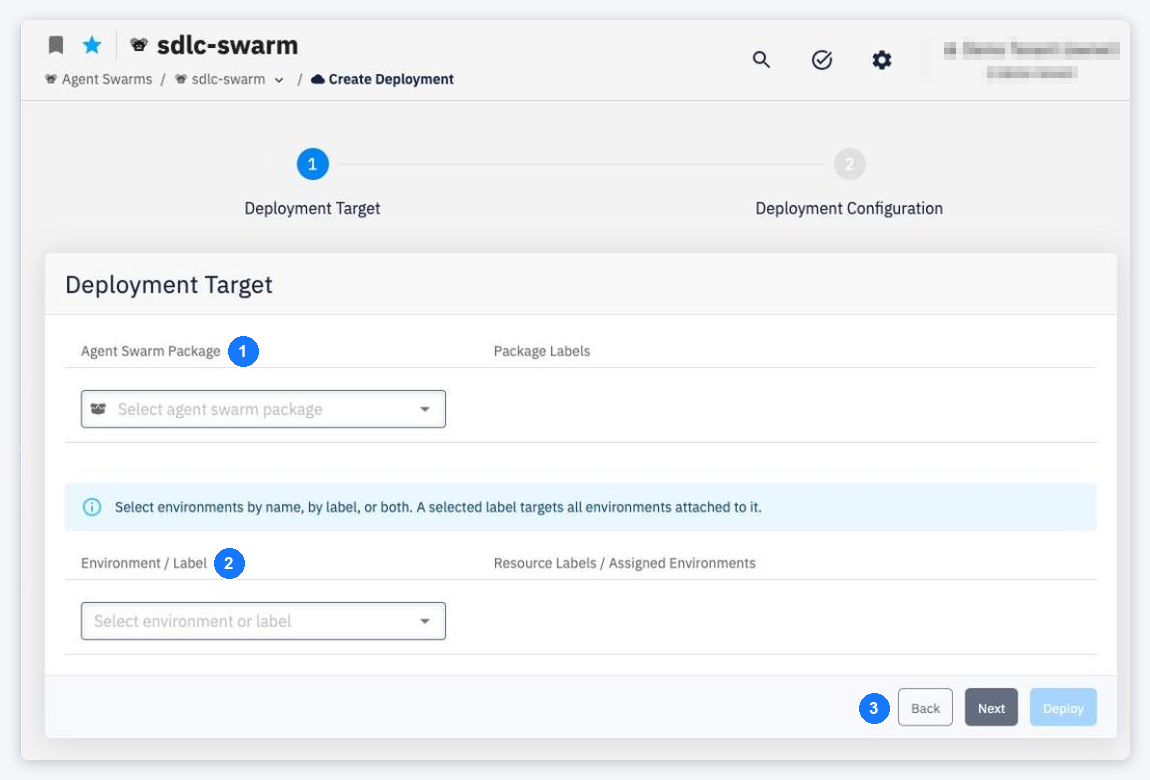
- Agent Swarm Package / Package Labels — select the package version to deploy (Select agent swarm package).
- Environment / Label — select targets by environment name, by label, or both. A selected label targets all environments attached to it, listed under Resource Labels / Assigned Environments.
- Back / Next / Deploy — Next shows the second step Deployment Configuration with the configuration that will be used for each target; Deploy starts the deployment. When any target is a production environment, CodeNOW asks for an explicit confirmation first.
Without packages the wizard shows No agent swarm packages found / Please, create some agent swarm packages first. Without the right to deploy: You don't have the necessary rights to deploy the selected agent swarm package.
For each agent of the swarm, a deployment:
- checks the agent configuration — service account set, A2A connections filled in and valid;
- composes the agent's environment variables (see Agent Runtime);
- issues a token for the agent's service account — or reuses the token of the existing deployment, so a redeploy without changes does not restart the agent;
- registers the agent in the Agent Gateway, if its A2A endpoint is exposed;
- registers the agent's admin console sign-in address, if the agent has an external endpoint.
Changes of the agent configuration — service account, console access, A2A endpoint, A2A connections — take effect only after the agent is redeployed. A target agent deployed later starts working for its callers without redeploying them.
Deployment and undeployment of the same swarm in the same environment never run at the same time; they are processed one after another.
Redeploy
A redeploy (for example to apply a changed agent configuration) is started with Redeploy in the deployment's ⋯ menu on the Deployments card, or with the repair action on the deployment status. It runs as the same Deploy Agent Swarm job as a deployment, with the same steps — A2A validation, Agent Gateway provisioning and waiting for the rollout — and the same warnings. In the job history it is listed as a deploy.
| Result | What you see |
|---|---|
| Started | Redeploy requested with the link Go to job run detail |
| No current deployment of the swarm in that environment | There is no current deployment to redeploy. |
| Invalid A2A connections (rejected before a job is queued) | The A2A validation message, e.g. Invalid A2A connections: … |
| Any other failure | Could not request deployment synchronization. |
Through the API, a redeploy without a current deployment returns 404 Deployment for <swarm>/<environment> was not found, and invalid A2A connections return 400.
Errors that stop a deployment
In the deploy wizard, an agent without a service account (Not set — this agent cannot be deployed.) or with an unfilled declared A2A connection is marked with a red error icon and Deploy stays disabled. When a deployment is started anyway (for example through the API), it fails with:
| Cause | Message (shortened) |
|---|---|
| No service account | Agent component … has no agentGateway.serviceAccountId configured - configure a service account on the agent's deployment configuration (agent configuration tab) or remove the agent from the package |
| Service account missing | service account … referenced by agent … does not exist in account … |
| Service account disabled | … is disabled: enable it or pick another one in the agent's deployment config |
| Expired secrets | … has expired secret bindings: … - rotate or unbind them in account before deploying |
| A2A connection without target | Invalid A2A connections: … declared A2A connection has no target … |
| No gateway address for the account | No Agent Gateway endpoint (AI_GATEWAY) resolved for account … - is the Agent Gateway installed for this account? |
| Gateway address cannot be parsed | The Agent Gateway endpoint (AI_GATEWAY) URL '…' of account … cannot be parsed - cannot derive the A2A agent URLs |
Warnings
The deployment succeeds but reports agents that could not be registered in the Agent Gateway. In the job detail the task stays Completed, its Message shows the warning in amber with a warning icon, and the collapsed phase row shows a warning icon (1 warning / N warnings):
- No Agent Gateway installed for account <account>: <n> agent(s) not registered in Agent Gateway: <agents>
- <n> agent(s) not registered in Agent Gateway (no usable internal|external endpoint): <agents>
Such agents run but cannot be called through the gateway. When a gateway is installed later, agents are registered on their next deployment.
The deployment (and a redeploy) also reports service-account secrets that were not passed to an agent or that replaced another variable. They are shown in the job detail as the warning of the step that waits for the rollout — the step still completes; several warnings are joined with ; :
- Service-account secret <ENV_NAME> was not passed to agent <agentId>: the name is reserved for CodeNOW. — rename the secret (see Reserved names).
- A service-account secret without an environment variable name was not passed to agent <agentId>.
- Service-account secret <ENV_NAME> overrides the environment variable of the same name (agent <agentId>). — the secret wins over the component's own environment variable.
Undeploy
Use Undeploy (the power icon) on a deployment in the Deployments card and confirm Are you sure you want to undeploy <swarm> from <environment>? — Request to undeploy sent successfully.
Undeploying an agent swarm from an environment runs as the Undeploy Agent Swarm job with four steps:
| Step | What it does |
|---|---|
| Delete | Removes the swarm's workloads from the environment |
| Agent Gateway deregistration | Removes the agents from the Agent Gateway |
| Redirect URI removal | Removes the agents' admin console sign-in addresses |
| Token release | Revokes the service-account tokens of the agents |
If one step fails, the job ends as failed, but the following steps still run. If the job cannot be started, the deployment stays deployed: Undeploy was rejected by job-controller (…); the deployment was left deployed.
A token is also revoked when an agent is removed from the swarm or switched to another service account.