Preview Deployment
A Preview Deployment is a deployment that runs a Preview Package — a temporary, ad-hoc composition of component versions that does not correspond to any released application version. It is always paired with a Preview Configuration.
Because a preview deployment is not based on a reproducible released package, it cannot be straightforwardly replicated on another environment. It is intended for specific development scenarios where you need to test a temporary state of the application before committing to a release.
How It Appears in the Deployments List

| # | Element | Description |
|---|---|---|
| 1 | Package Version — Preview | The warning badge indicates the deployment is running a Preview Package rather than a released version |
| 2 | Configuration Version — Preview | The deployment is using a Preview Configuration instead of a standard deployment configuration interval |
Preview Package
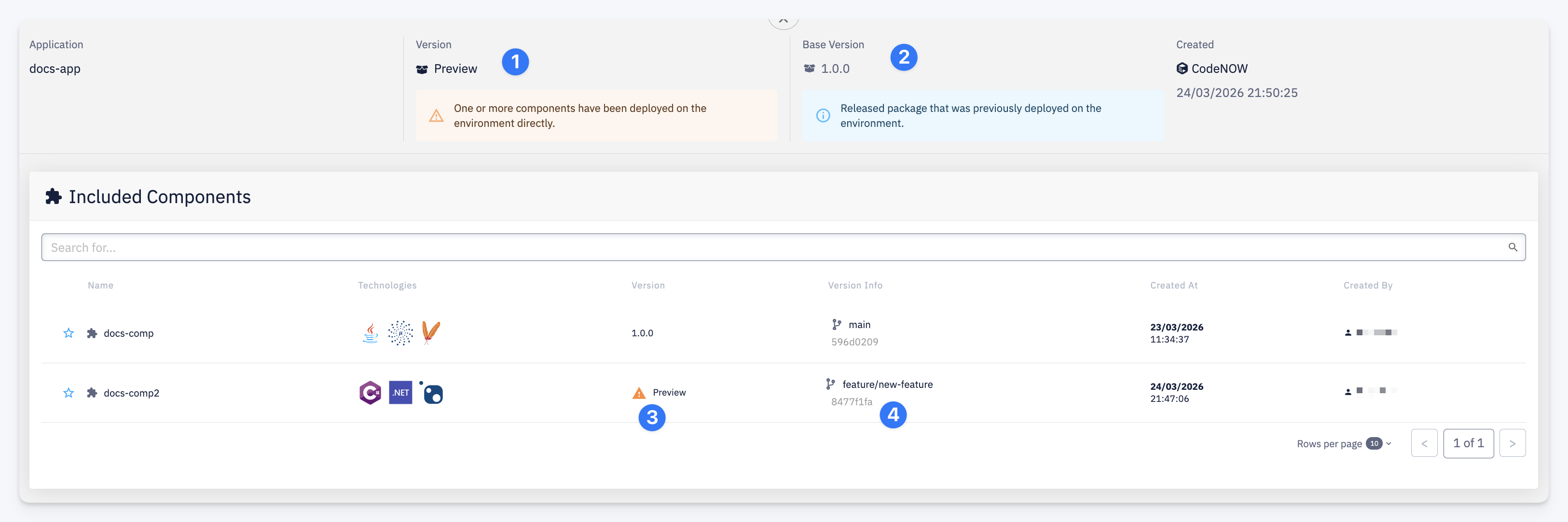
| # | Element | Description |
|---|---|---|
| 1 | Version — Preview | The package is a preview. If any component was deployed directly to the environment (not via a preview build), a warning is shown: One or more components have been deployed on the environment directly |
| 2 | Base Version | The released package that was previously deployed on this environment. The preview package is built on top of this baseline — components not explicitly overridden run at their base version |
| 3 | Component version — Preview | A component whose version was replaced by a preview or directly deployed build. Its version shows as Preview instead of a release number |
| 4 | Version Info | The source branch and commit hash the preview component version was built from |
When Preview Deployments Are Used
Preview deployments are suited to scenarios where you need to test a temporary state of the application that is not yet ready for a full release:
- Feature branch testing — a Preview Build assembles components from their feature branches into a preview package and deploys it to a development environment, letting you verify a work-in-progress feature end-to-end across multiple components
- Production hotfix validation — starting from a stable released version on an environment, you deploy fixed versions of one or more components directly to test the fix in context before assembling the final hotfix release package
- Isolated component testing — deploying a single component version directly to verify its behaviour against the current state of the rest of the application
How a Preview Deployment Is Created
A preview deployment arises in two ways:
- Via a Preview Build — the CI pipeline builds components from their feature branches and deploys the resulting preview package to the target environment automatically; see Build Overview
- Via direct component deployment — one or more released component versions are deployed directly to an environment outside of a full application package release; the resulting running state is represented as a preview deployment
Lifecycle
A preview deployment exists for as long as the preview package is running on the environment. It is replaced when:
- A released package is deployed to the environment (standard release deploy)
- The application is undeployed from the environment