Default Configuration
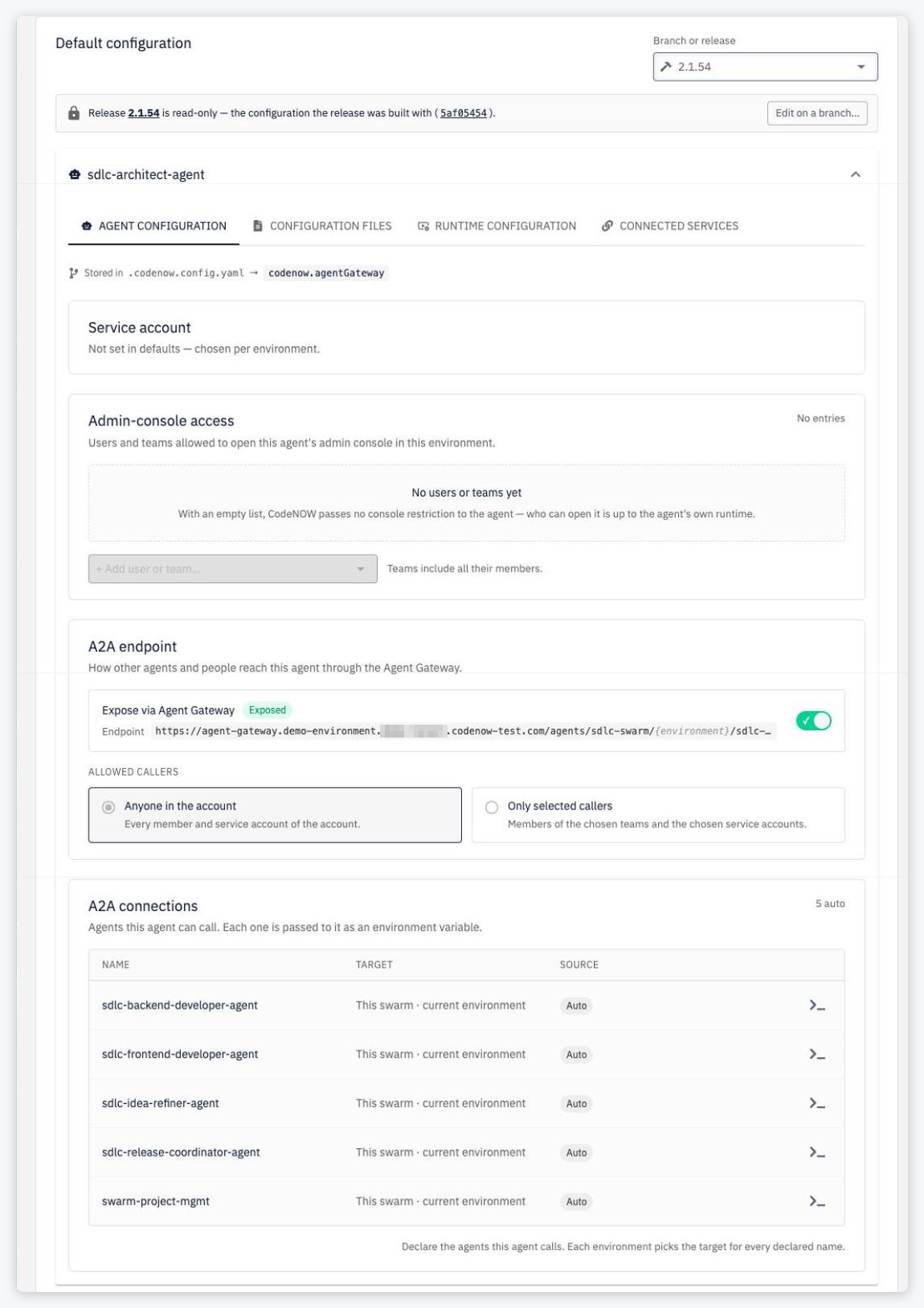
The Default configuration card on the detail of an application component or an agent (shown once it is Ready) shows the component's default configuration — the values used in every environment that has no own value in its deployment configuration. It replaces the former Runtime Configuration and Connected Services cards.
Where it is stored
The default configuration lives in the component's Git repository, next to the component's code:
| Path (relative to the component path) | Content |
|---|---|
.codenow.config.yaml → codenow.runtime | Runtime configuration — instances, CPU/memory request and limit |
.codenow.config.yaml → codenow.connections | Connected services the component expects (declarations) |
.codenow.config.yaml → codenow.agentGateway | Agents only — the agent configuration defaults |
codenow/config/* | Configuration files, environment-variables, helm-values.yaml |
Because it is in Git, every released version carries its own defaults.
Branch or release
Pick what to look at in Branch or release (groups Release Versions and Preview (Branches); the latest release is preselected, otherwise the default branch):
- A release — Release <version> is read-only — the configuration the release was built with (<sha>). Edit on a branch… switches to a branch.
- A branch — Editing branch <branch> at <sha>. Saving creates a commit on this branch. The branch is read-only when you lack the permission to edit, when it is protected or when you can't push to it.
The card has the tabs AGENT CONFIGURATION (agents only), CONFIGURATION FILES, RUNTIME CONFIGURATION and CONNECTED SERVICES; each section shows where it is stored (Stored in <path> → <yaml key>, linked to Git).
Editing on a branch
- Select a branch you can edit.
- Change runtime values, configuration files and — for agents — the agent configuration defaults. A save bar shows the number of unsaved changes and the fixed commit message
change default configuration by <username>. - Click Save to <branch> (or Discard).
Saving creates one commit on the branch containing all changes (.codenow.config.yaml and codenow/config/*).
Default configuration saved. It takes effect after the next build. — the defaults of a version are read when its build finishes.
Notes:
- Connected services are shown as declarations — the type of service the component needs — and are read-only here. Which concrete service fulfils them is chosen per environment in the deployment configuration.
- Configuration files can be edited, but not added or deleted from the card.
- Keep
.codenow.config.yamlplain YAML: CodeNOW rewrites the file on save, so comments and formatting in it are not preserved.
Git provider differences
| Provider | Behaviour |
|---|---|
| GitHub, GitLab, CodeNOW Git, Bitbucket Cloud, Azure DevOps Server | One atomic commit |
| Bitbucket Data Center | Saved as several commits (one per file), not atomic, and files cannot be deleted. The save bar warns: This repository (<provider>) saves changes as several commits; an error midway can leave a partial change. |
Errors
| Situation | Message |
|---|---|
| Someone pushed to the branch since you opened it | Dialog This branch has changed since you opened it — Reload drops your edits and shows the latest configuration; Keep my changes lets you save them on top of the newer commit, overwriting what it set in the areas you edited. |
The stored .codenow.config.yaml is not valid YAML (agents) | The stored configuration in git (.codenow.config.yaml at <sha>) can't be parsed: … Fix it in git, then reload. Saving stays disabled until you reload. |
| The Git provider refused the commit (e.g. protected branch) | The repository rejected the change: … — your edits are kept. |
| The Git provider is not supported for editing | Saving the default configuration is not supported on SCM provider … : it cannot guard the commit against concurrent changes |
For an application component (not an agent), a .codenow.config.yaml that cannot be parsed is replaced on save — the card says so (Saving replaces it with the configuration below.). Check the file in Git first if you edited it by hand.
Agent Gateway section
For agents, .codenow.config.yaml also holds the defaults of the agent configuration. Agent templates ship it with these defaults:
codenow:
  connections: []
  runtime: {}
  agentGateway:
    # Identity the agent runs as. Usually left empty and picked per environment
    # (required before the first deployment). A committed value applies to every
    # environment without its own configuration.
    serviceAccountId: null

    # Who may open the agent's admin console. Empty = no restriction passed to the agent.
    consoleAllowedUsers: []
    consoleAllowedTeams: []

    # Agents of OTHER swarms this agent calls. Same-swarm agents are connected
    # automatically. Each entry declares a connection that is filled in per environment.
    a2aConnections: []
    #  - name: billing              # → BILLING_A2A_URL
    #    swarmId: finance-swarm
    #    environmentId: prod
    #    agentId: billing-agent

    # This agent's own A2A endpoint.
    a2aEndpoint:
      exposed: true                 # registered in the Agent Gateway
      allowedTeams: []              # both empty = anyone in the account
      allowedServiceAccounts: []    # service account IDs; same-swarm agents are always allowed
- Don't commit account-specific IDs (service accounts, teams, swarms) into a template — pick them per environment.
- Never put secrets here; agents receive credentials only as environment variables at deploy time.
- To let an environment target another swarm's agent, declare the connection here and build a new version first.