Agent Configuration
Open AI › Agent Swarms › <swarm>, card Deployment Configurations, and create (Create Configuration) or open a configuration. Each agent has the tabs AGENT CONFIGURATION (opened first), CONFIGURATION FILES, RUNTIME CONFIGURATION and CONNECTED SERVICES. The agent configuration is set per environment and saved with Confirm; every section has Revert changes.
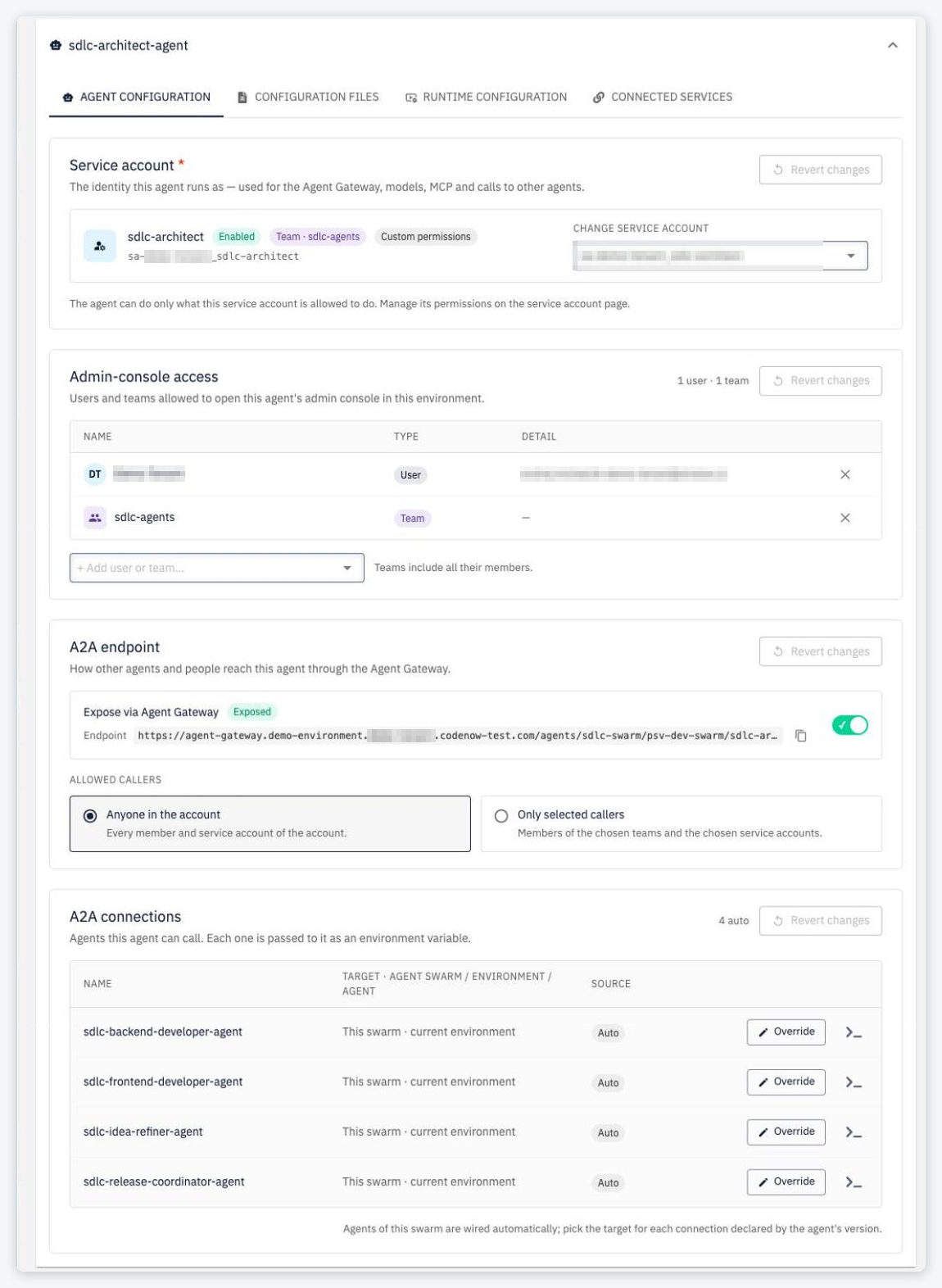
The defaults come from the agentGateway section of the agent's .codenow.config.yaml (see Default Configuration). A value stored for an environment wins over the default; missing values fall back to the default.
Changes take effect on the next deployment of the agent.
Service account
The identity this agent runs as — used for the Agent Gateway, models, MCP and calls to other agents. Required — saving without one fails with A service account is required before this agent can be deployed.
Pick one with Select service account… (options show whether they are team- or user-owned; disabled service accounts are visible but cannot be selected), or follow the link to create a new one. A selected service account shows its state, owner and permission mode (Follows team permissions / Custom permissions); Change service account replaces it.
- You can select only service accounts you own or that are owned by a team you are a member of; account Owners and Admins can select any. Selecting another one fails with You may not use service account ….
- The check happens when you save the configuration. Anyone allowed to deploy can then deploy it.
- A service account committed in the agent's default configuration applies to every environment without its own value — usually it is left empty there and picked per environment.
See Service Accounts.
Admin console access
Users and teams allowed to open this agent's admin console in this environment. Add them with + Add user or team… (teams include all their members). CodeNOW passes the lists to the agent (CONSOLE_ALLOWED_USERS, CONSOLE_ALLOWED_TEAMS); the agent checks them against the signed-in user's token.
With an empty list, CodeNOW passes no console restriction to the agent — who can open it is up to the agent's own runtime.
A2A endpoint
How other agents and people reach this agent through the Agent Gateway.
| Setting | Effect |
|---|---|
| Expose via Agent Gateway off (Not exposed) | The agent is not registered in the gateway. Agents of this swarm don't get its URL and other swarms can't connect to it. |
| Expose via Agent Gateway on (Exposed, default) | The Endpoint <gateway>/agents/<swarm>/<environment>/<agent> is shown with a copy button. Allowed callers decide who may call it: |
| › Anyone in the account (default) | Every member and service account of the account. |
| › Only selected callers | Members of the chosen teams and the chosen service accounts (+ Add team or service account…; teams include their members and team-owned service accounts). Other account members get 403. At least one caller is required. |
- Agents of the same swarm can always call each other (row Agents of this swarm — Always allowed), even when the endpoint is restricted.
- Restrictions only narrow access within the account; callers from other accounts are always rejected.
- Errors on save: Invalid A2A endpoint: agent '…': team '…' not found (or duplicate team, service account '…' not found, duplicate service account, blank names).
A2A connections
Agents this agent can call. Each one is passed to it as an environment variable — <NAME>_A2A_URL plus an entry in A2A_AGENTS (see Agent Runtime). The >_ button of a row (Connection Properties) shows these variables and how to map them in codenow/config/environment-variables.
The Source column tells where a connection comes from: Auto (an agent of the same swarm), Overridden, Declared or Configured.
- Same-swarm agents in the same environment are connected automatically (This swarm · current environment) — no entry needed. Override points such a connection elsewhere, Reset to auto undoes it.
- Agents of other swarms (or another environment) must be declared by the agent in its default configuration (
agentGateway.a2aConnections). In the environment's agent configuration you pick the target of each declared connection: Select agent swarm › Select environment › Select agent. - A connection named like a same-swarm agent overrides the automatic connection.
- Only declared connections (and overrides of same-swarm agents) can be filled in; to add a new one, declare it in the agent's repository and build a new version.
- Targets whose A2A endpoint is not exposed cannot be selected (does not expose its A2A endpoint in this environment). Legacy rows not declared by the version are marked Not declared by this version — will be rejected on save.
- A target that is not deployed yet can be selected; the agent gets its URL, and calls start working once the target is deployed.
Saving allows declared connections without a target (Choose the target agent), but a declared connection without a target blocks the deployment — in the deploy wizard the agent and its AGENT CONFIGURATION tab get a red error icon and Deploy is disabled; through the API the deployment fails with:
Invalid A2A connections: agent '<agent>' connection '<name>': declared A2A connection has no target (swarmId, environmentId and agentId are required)
Other reasons reported in the same message: blank or duplicate name, not declared by the agent's version and not a same-swarm sibling, swarm / environment / agent not found, or does not expose its A2A endpoint in environment ….
Comparing agent configurations
The compare view of a swarm's deployment configurations includes the agent configuration — service account, console users and teams, A2A connections and the A2A endpoint settings.